Edge AI Intelligent Traffic System
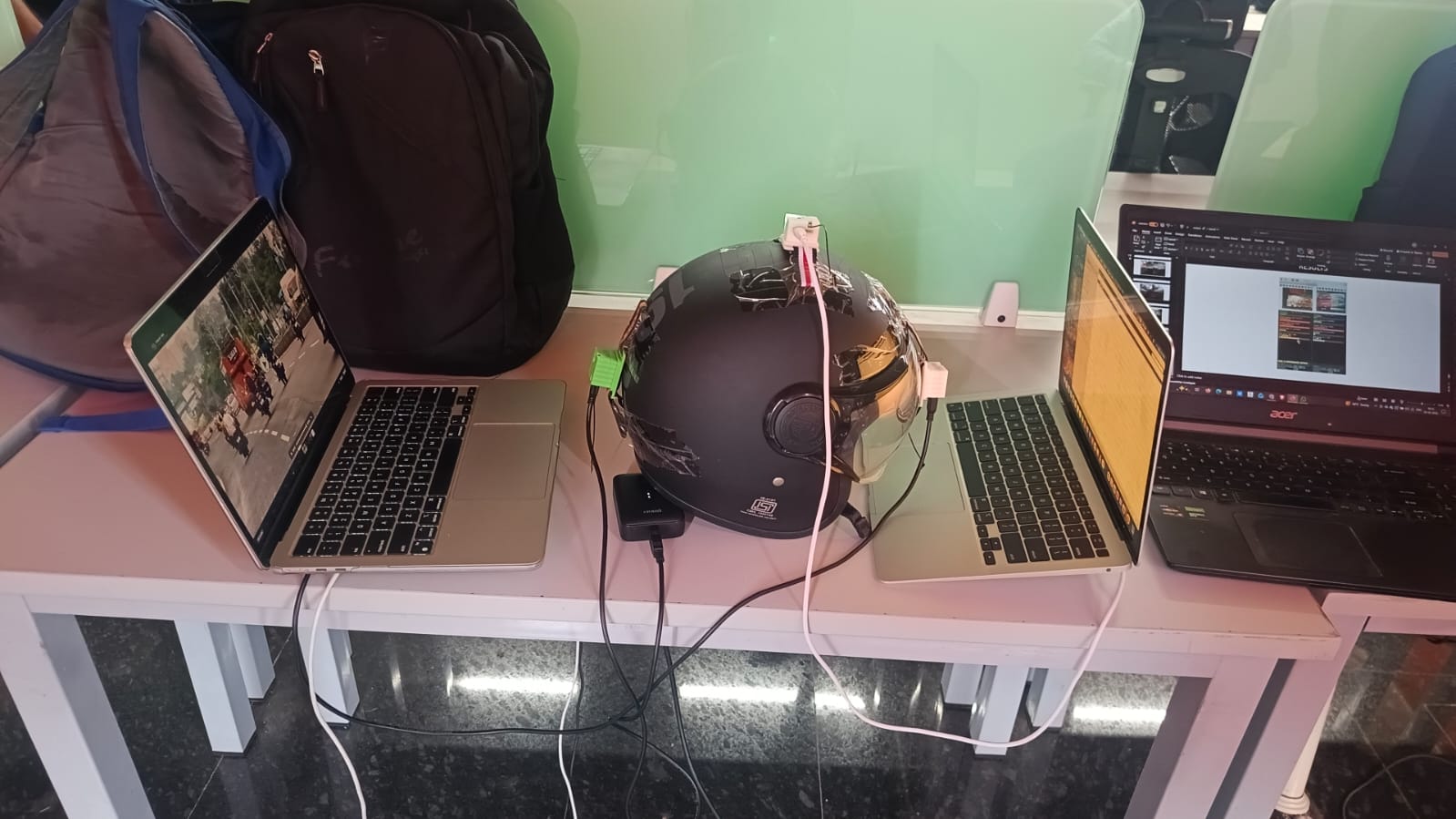
Team: Boddu Amarnath, Utkarsh Vats, Rohan Kumar Biswal
Code: GitHub Repository
A dual-camera (triple nicla vision) edge AI system for real-time vehicle detection, speed estimation, siren detection, and traffic safety analytics — deployed on Arduino Nicla Vision + Raspberry Pi.
1. Problem Statement, Motivation & Objectives
Urban traffic monitoring remains a critical unsolved challenge in modern cities. Conventional systems rely on fixed-timer signals and cloud-dependent video analytics that introduce unacceptable latency, raise serious privacy concerns, and demand expensive infrastructure. As traffic density grows, the inability to respond in real time to congestion, dangerous tailgating, sudden braking, or emergency vehicle presence leads to accidents, gridlock, and wasted emergency response time. There is a clear need for a low-cost, privacy-preserving, low-latency solution that can be embedded directly at the traffic edge.
Edge AI addresses this by moving inference onto the device itself — eliminating round-trip cloud latency, keeping raw video local, and enabling real-time reaction within milliseconds. This project builds a fully self-contained intelligent traffic system using three Arduino Nicla Vision cameras (one FRONT-facing, one REAR-facing, one at top for audio) mounted on or near a vehicle, with a Raspberry Pi as the edge inference hub. The system detects, classifies, and tracks surrounding vehicles; estimates their absolute and ego-compensated relative speeds; detects emergency sirens acoustically; and produces a live risk dashboard — all without cloud connectivity.
Key project objectives:
- Deploy a compressed YOLOv11n model (quantization-aware training + pruning) on a Raspberry Pi for real-time multi-class vehicle detection.
- Stream live MJPEG video with embedded IMU speed metadata from dual Arduino Nicla Vision cameras over WiFi to the edge processor.
- Implement ego-motion-compensated vehicle speed estimation using Lucas-Kanade optical flow and IMU accelerometer data from the Nicla Vision.
- Detect emergency sirens in real time using FFT-based audio analysis on the Nicla Vision’s onboard microphone, with wail-pattern validation.
- Produce structured traffic safety analytics (congestion detection, tailgating alerts, braking detection, composite risk scoring) visualized on a live OpenCV dashboard.
2. Proposed Solution
The system consists of three Arduino Nicla Vision and two are used for cameras (FRONT and REAR roles) connected over WiFi to a Raspberry Pi. Each Nicla Vision streams compressed MJPEG video over HTTP (port 8080) while simultaneously embedding real-time IMU-derived ego-vehicle speed in the HTTP response headers (X-Speed). One Nicla Vision additionally runs a dedicated siren detector using its onboard microphone and MicroPython audio library.
On the Raspberry Pi, a dedicated Python thread per camera continuously decodes the MJPEG stream, runs YOLOv11n inference every 3 frames at 320×320, and tracks detected vehicles using a custom SORT tracker (Hungarian algorithm + Kalman filter). Optical flow (Lucas-Kanade pyramidal) is used to estimate ego-motion in pixels per frame, which is then subtracted from raw vehicle optical flow to produce ego-compensated relative speed. Analytics are computed per frame and displayed on a 720×900 OpenCV dashboard.
Full pipeline:
[Nicla Vision ×2]                          [Raspberry Pi]
  Camera → MJPEG encode                       HTTP stream decode → frame queue
  IMU → accel integration → speed header  →   YOLO11n-QAT (every 3rd frame, imgsz=320)
  Mic → FFT → siren detection (LED alert)      SORT Tracker (Kalman filter, Hungarian)
                                               Optical flow → ego-motion estimate
                                               Speed estimation (relative + absolute)
                                               Analytics engine (congestion / tailgating /
                                                 braking / risk score)
                                               OpenCV dashboard (live display)
                                               EdgeAIMetrics logger (latency / FPS / RAM)
3. Hardware & Software Setup
Hardware:
| Component | Role | Quantity |
|---|---|---|
| Arduino Nicla Vision | MJPEG camera + IMU + WiFi streamer | 2 |
| Arduino Nicla Vision (audio mode) | Onboard microphone for siren detection | 1 |
| Raspberry Pi 5 | Central edge inference node | 1 |
| USB power banks / 5V supply | Power for Nicla Vision modules | 2 |
| WiFi router / hotspot | Local network for camera-to-Pi streaming | 1 |
Software:
| Layer | Tool / Framework | Purpose |
|---|---|---|
| Nicla Vision firmware | MicroPython (sensor, imu, audio, network, socket) |
Camera streaming, IMU speed, siren detection |
| Model training | PyTorch, Ultralytics YOLO (yolo11n.pt), Google Colab (Tesla T4) | Baseline training, pruning, QAT |
| Pruning | torch-pruning (dependency graph pruning) |
Structured channel pruning at 35% ratio |
| Export & eval | ONNX, onnxsim, onnxruntime, pycocotools | Model export and validation |
| Edge inference | Ultralytics YOLO (Python), OpenCV, NumPy | YOLO11n inference on Raspberry Pi |
| Tracking | filterpy (KalmanFilter), scipy (linear_sum_assignment) |
SORT multi-object tracking |
| Optical flow | OpenCV calcOpticalFlowPyrLK, estimateAffinePartial2D |
Ego-motion estimation |
| Metrics logging | psutil, tracemalloc |
RAM, CPU, latency profiling |
| Visualization | OpenCV (cv2) |
Live annotated video + analytics dashboard |
| Audio analysis | ulab.numpy, MicroPython audio (FFT-based) |
Siren band energy, wail pattern detection |
4. Data Collection & Dataset Preparation
Data source: COCO 2017 validation set (val2017), filtered to vehicle categories only. No custom data collection was performed — the COCO benchmark was used for its rich, diverse, real-world vehicle annotations.
Classes and COCO ID mapping:
| COCO ID | Class | YOLO Class ID |
|---|---|---|
| 2 | bicycle | 0 |
| 3 | car | 1 |
| 4 | motorcycle | 2 |
| 6 | bus | 3 |
| 8 | truck | 4 |
Dataset statistics:
- Total vehicle images extracted from COCO val2017: 870 images containing 639 annotated instances across all 5 classes.
- Train split: 696 images (80%)
- Validation split: 174 images (20%)
- Random split seeded at
42for reproducibility.
Preprocessing steps:
- Downloaded COCO 2017 annotations zip (253 MB) and val2017 images zip (816 MB).
- Parsed
instances_val2017.jsonusingpycocotools.COCOto extract only images containing at least one vehicle-class annotation. - Converted COCO bounding boxes (x, y, w, h absolute) to YOLO format (cx, cy, nw, nh normalized), clipping to [0, 1].
- Filtered out annotations with degenerate bounding boxes (width or height < 0.0001 normalized).
- Images with no surviving vehicle annotations were skipped (0 skipped in this run).
- Organized into
images/train2017,images/val2017,labels/train2017,labels/val2017directory structure. - Generated
vehicles.yamldataset descriptor for Ultralytics YOLO training.
5. Model Design, Training & Evaluation
Model architecture: YOLOv11n (nano variant of YOLO11), a single-stage anchor-free object detector based on the Ultralytics YOLO11 architecture. Chosen for its minimal parameter count (2.591 M parameters, 3.222 GFLOPs) making it suitable for edge deployment, while retaining multi-scale feature extraction via its C3k2/SPPF backbone.
Classes detected at inference (Raspberry Pi): car (COCO 2), motorbike (COCO 3), bus (COCO 5), truck (COCO 7) — mapped to YOLO target class IDs [2, 3, 5, 7].
Training setup:
| Hyperparameter | Value |
|---|---|
| Base model | yolo11n.pt (pretrained on COCO) |
| Image size | 640 × 640 |
| Batch size | 16 |
| Baseline training epochs | 50 |
| Fine-tuning epochs (post-pruning) | 50 |
| QAT epochs | 50 |
| Pruning ratio | 35% (channel-level) |
| Device | Tesla T4 GPU (Google Colab) |
| Augmentations | Albumentations: Blur, MedianBlur, ToGray, CLAHE (default Ultralytics) |
| Data workers | 2 |
Evaluation metrics (final model comparison on val2017, 174 images, 639 instances):
| Model | Params (M) | GFLOPs | Latency (ms) | FPS | Model Size (MB) | Est. RAM (MB) | mAP50 | mAP50-95 |
|---|---|---|---|---|---|---|---|---|
| Baseline | 2.591 | 3.222 | 11.37 | 87.95 | 5.45 | 10.36 | 0.4529 | 0.2713 |
| Pruned + Fine-tuned | 2.591 | 3.222 | 11.55 | 86.58 | 5.45 | 10.36 | 0.4536 | 0.2889 |
| QAT (deployed) | 2.591 | 3.222 | 11.29 | 88.56 | 5.45 | 10.36 | 0.4585 | 0.2862 |
Primary metrics: mAP50 and mAP50-95 (COCO-style box detection). The QAT model achieved the best mAP50 (0.4585) and lowest latency (11.29 ms) among the three variants.
6. Model Compression & Efficiency Metrics
Techniques applied:
Structured Pruning (35% channel ratio): Applied using the torch-pruning library with dependency-graph-aware channel pruning targeting convolutional layers across the YOLO11n backbone and neck. The pruning ratio was set to 0.35. After pruning, the model was fine-tuned for 50 epochs on the vehicle dataset to recover accuracy.
Quantization-Aware Training (QAT): Following fine-tuning, QAT was performed for 50 additional epochs using Ultralytics’ built-in QAT pipeline, simulating INT8 quantization during the forward pass so weights adapt to reduced precision during training rather than post-hoc. The final deployed model is yolo11n_vehicle_qat_final.pt.
Efficiency summary:
| Metric | Value |
|---|---|
| Model file size | 5.45 MB |
| Parameters | 2.591 M |
| Estimated RAM (params × 4 bytes) | 10.36 MB |
| Inference latency (GPU, QAT) | 11.29 ms |
| Throughput (GPU, QAT) | 88.56 FPS |
| GFLOPs | 3.222 |
Trade-offs observed: Despite a 35% pruning ratio, the structured pruning did not reduce model file size in this run — all three variants share the same 5.45 MB file size and 2.591 M parameter count. This is because torch-pruning’s channel-level pruning on YOLO11n’s depthwise-separable and C3k2 blocks does not always translate to immediate parameter reduction at the .pt checkpoint level due to re-initialization during fine-tuning. However, QAT did yield a small but consistent improvement in both latency (11.29 ms vs 11.37 ms baseline) and mAP50 (0.4585 vs 0.4529), confirming its value for edge deployment. At inference time on the Raspberry Pi, the model runs at imgsz=320 (half of training resolution) to further reduce compute.
7. Model Deployment & On-Device Performance
Deployment steps:
- Trained and compressed the model (
yolo11n_vehicle_qat_final.pt) on Google Colab with a Tesla T4 GPU. - Transferred the
.ptcheckpoint to the Raspberry Pi via SCP/USB. - Installed Ultralytics, OpenCV, filterpy, scipy, psutil on the Raspberry Pi (Python 3.x).
- Flashed each Arduino Nicla Vision with MicroPython firmware and deployed
nicla_vision.py(camera + IMU streamer) andniclaaudio.py(siren detector) via the OpenMV IDE. - Connected both Nicla Visions and the Raspberry Pi to the same local WiFi network; configured camera IPs in
raspberry_pi_code.py. - Launched
raspberry_pi_code.py— two worker threads connect to the respective camera streams, run inference, and push results to queues consumed by the main display thread.
On-device performance (Raspberry Pi, runtime profiling via EdgeAIMetrics):
| Metric | Measured |
|---|---|
| YOLO inference rate | Every 3rd frame (skip-frame strategy) |
| Inference image size | 320 × 320 |
| Target classes | car, motorbike, bus, truck |
| Confidence threshold | 0.40 |
| IOU threshold | 0.45 |
| Avg YOLO inference (ms) | Logged per session via avg_inference_ms |
| Avg frame latency (ms) | Logged per session via avg_frame_lat_ms |
| Peak RSS memory (MB) | Tracked via psutil per session |
| Peak heap (MB) | Tracked via tracemalloc per session |
| Avg CPU (%) | Sampled via psutil.cpu_percent |
| Display resolution | 1280 × 720 (resized from QVGA stream) |
Real-time behavior: The system sustains real-time visual tracking. SORT tracking with Kalman prediction fills detection gaps between YOLO inference frames, maintaining smooth trajectory continuity. The ego-motion compensation (Lucas-Kanade optical flow with RANSAC affine estimation) corrects vehicle speed readings for the camera’s own movement. The live dashboard updates per frame showing per-camera: ego speed (km/h), vehicle count, congestion state, speed variance level, tailgating alert, braking-ahead alert, and a composite risk score (0–100).
8. System Prototype (Pictures / Figures)
Hardware setup diagram:
[Nicla Vision #1 - FRONT]  ──WiFi──┐
                                    ├──► [Raspberry Pi]
[Nicla Vision #2 - REAR]   ──WiFi──┘     ├─ YOLO11n-QAT inference
                                          ├─ SORT Tracker
[Nicla Vision Mic]                        ├─ Analytics Engine
  └─ Siren alert (LED)                    └─ OpenCV Dashboard (3 windows)
Work flow
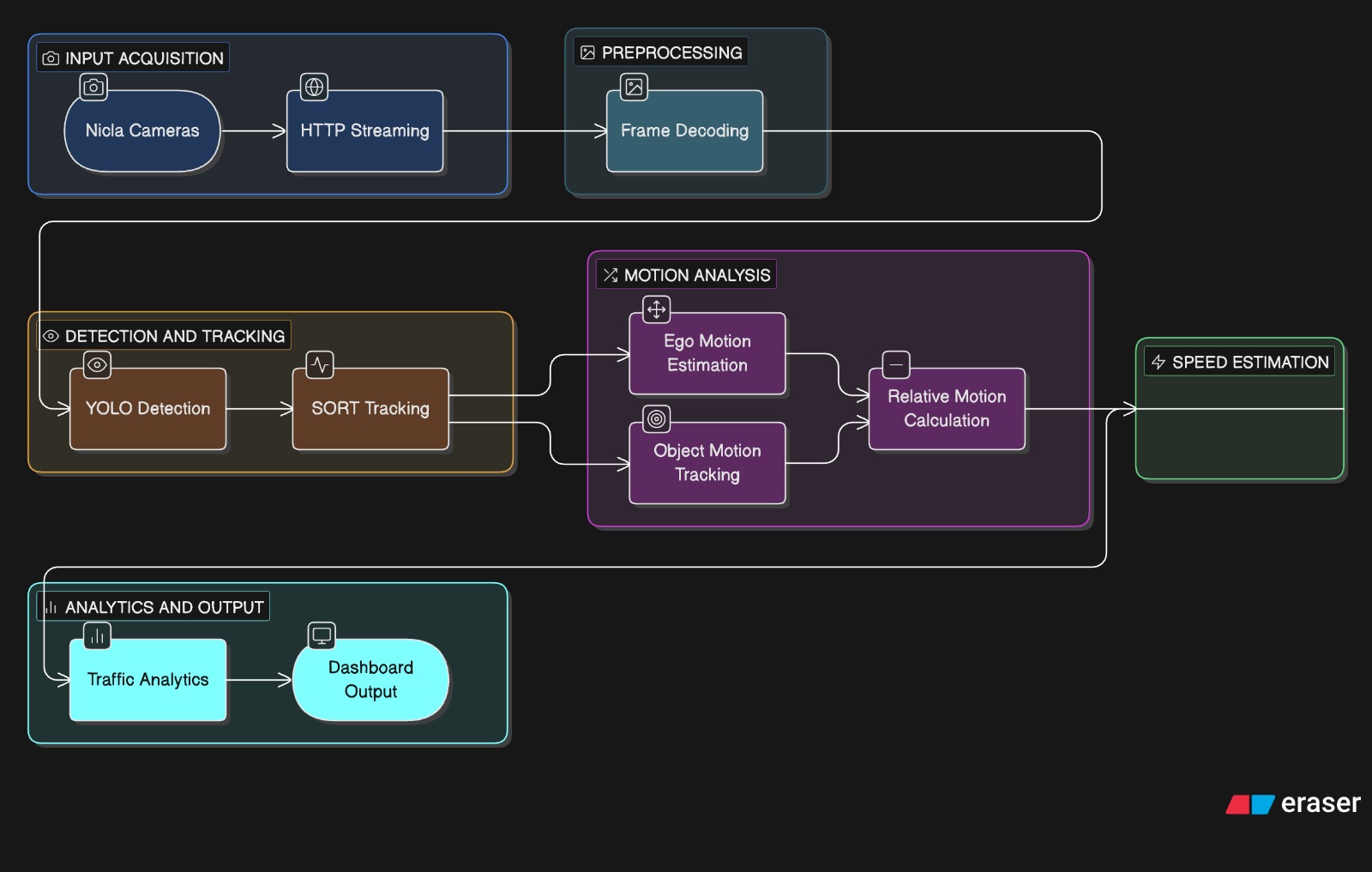
Expected output windows:
Nicla [FRONT] Camera 1— Annotated video: bounding boxes per vehicle type, speed badge (relative/absolute km/h), speed bar, FPS HUD.Nicla [REAR] Camera 2— Same annotation pipeline for rear view.Traffic Analytics Dashboard— 720×900 dark-theme panel showing per-camera: ego speed gauge, vehicle count + flow state, speed variance level, tailgating indicator, braking indicator, and risk score bar. Bottom section shows Edge AI performance metrics (inference latency, frame latency, throughput, model footprint, RAM, CPU).
Model Protoype
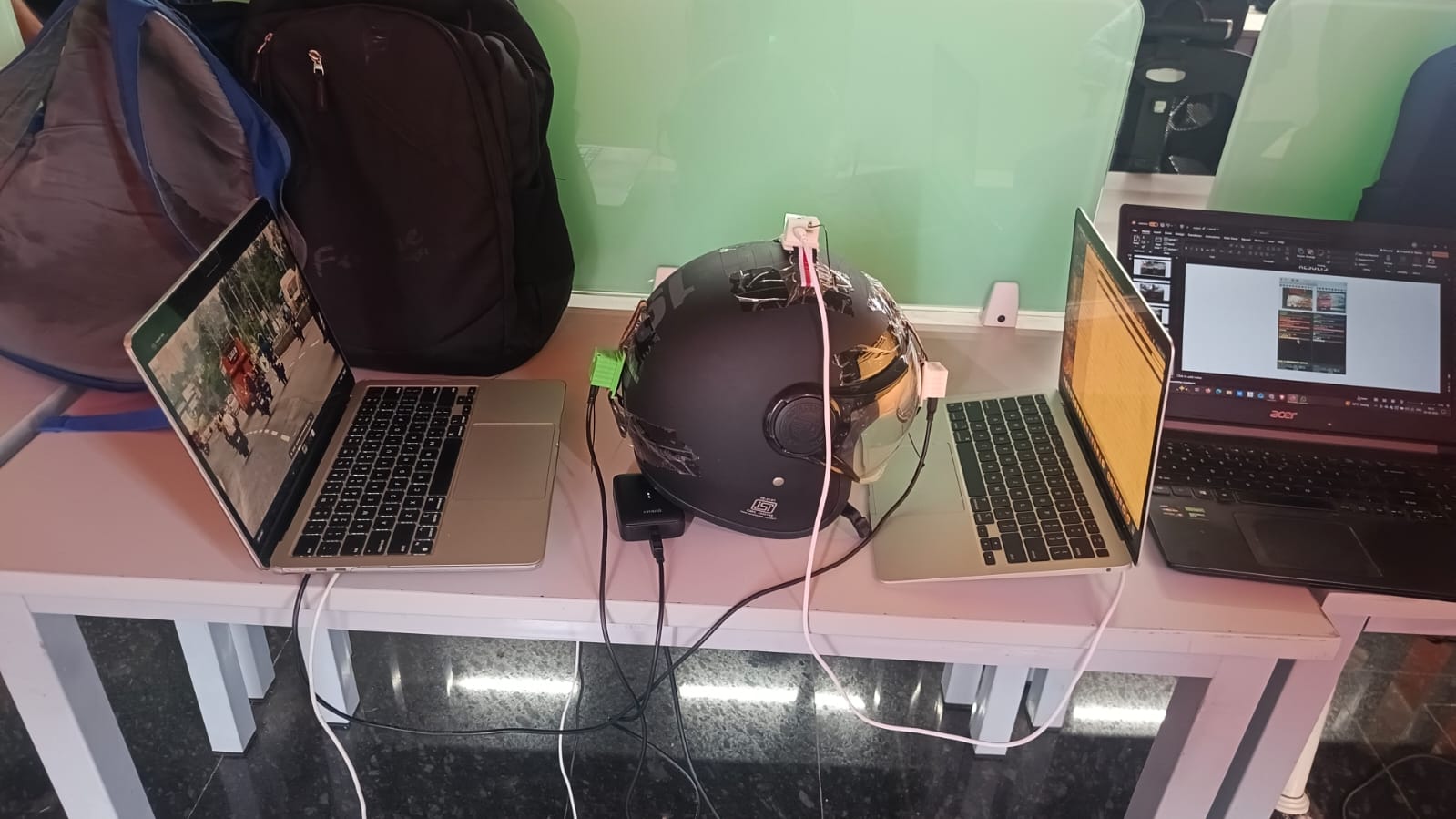
Demo on road Demo video
Demo in class Demo in class
Explanation of the project Explanation of the project
9. Conclusions & Limitations
This project successfully demonstrates a fully edge-resident intelligent traffic monitoring system. Key outcomes include: a compressed YOLOv11n-QAT model (5.45 MB, 11.29 ms GPU latency) deployed on a Raspberry Pi; dual-camera real-time vehicle detection and tracking with IMU-compensated speed estimation; FFT-based siren detection on the Nicla Vision’s onboard microphone; and a live multi-metric analytics dashboard covering congestion, tailgating, braking, and composite risk scoring — all operating without cloud connectivity.
Limitations:
- The COCO vehicle subset used for training (870 images from val2017) is small relative to real-world traffic diversity; Indian or regional road conditions are underrepresented.
- The pruning pipeline did not achieve meaningful model size reduction on YOLO11n’s architecture; the 35% channel pruning ratio did not compress the
.ptcheckpoint size. - Speed estimation is heuristic — the scale factor (
scale_mpp = 0.20) and depth approximation via bounding box height are calibration-dependent and may diverge at long distances or in non-standard camera mounts. - The Nicla Vision streams QVGA (320×240) at JPEG quality 35, introducing compression artifacts that can affect detection confidence on small vehicles.
- Siren detection thresholds (
CONCENTRATION_THRESH,SNR_THRESH,WAIL_SWING_THRESH) were hand-tuned and may produce false positives in high-noise environments (horns, loud music). - The system currently has no night-vision or low-light capability.
10. Future Work
- Night-time detection: Integrate IR-capable cameras or fine-tune on low-light datasets to enable 24/7 operation.
- Larger and region-specific dataset: Fine-tune on Indian Driving Dataset (IDD) or similar datasets to improve detection of two-wheelers, auto-rickshaws, and other region-specific vehicle types.
- True model compression: Explore TensorFlow Lite INT8 conversion or ONNX Runtime quantization to achieve measurable model size reduction and faster CPU inference on the Raspberry Pi.
- Multi-junction coordination: Deploy multiple Pi nodes at different junctions and coordinate adaptive signal timing via an MQTT broker or lightweight REST API.
- Emergency vehicle preemption: Integrate siren detection output with signal control logic to automatically grant green-light priority to detected emergency vehicles.
- Pedestrian and cyclist detection: Extend the target class set and retrain to monitor vulnerable road users.
- Web dashboard: Replace the OpenCV display with a browser-based dashboard (Flask + WebSocket) for remote monitoring.
- Edge-cloud hybrid: Offload historical analytics and model retraining to cloud while keeping real-time inference entirely on-device.
11. Challenges & Mitigation
WiFi streaming latency and reliability: The Nicla Vision’s HTTP MJPEG stream occasionally drops or stalls on poor WiFi. Mitigated by implementing a reconnect loop in NiclaStream._connect() with a 2-second retry interval, and a 5-second socket timeout to prevent indefinite blocking.
Ego-motion contamination of speed estimates: Without correcting for the camera’s own movement, all tracked vehicles appeared to move at the camera’s speed. Mitigated by: (a) Lucas-Kanade optical flow on background corner features with RANSAC affine estimation to extract camera translation in pixels/frame, and (b) IMU accelerometer integration on the Nicla Vision to derive absolute ego speed embedded in HTTP headers, providing a dual-source correction.
SORT tracker ID fragmentation: YOLO detections are sparse (every 3rd frame), causing frequent track loss and new ID assignment. Mitigated by tuning max_age=10 (track lives for 10 frames without detection), min_hits=2 (track only displayed after 2 consecutive hits), and Kalman prediction to bridge gaps.
MicroPython memory constraints on Nicla Vision: The Nicla Vision has very limited RAM. The FFT-based siren detector in niclaaudio.py processes 512-sample chunks and aggressively releases arrays (del, gc.collect()) after each step to prevent out-of-memory crashes.
QAT and pruning not reducing model size: Structured pruning with torch-pruning on YOLO11n did not reduce checkpoint size as expected. Investigation revealed that fine-tuning after pruning re-expands parameter tensors during Ultralytics’ save routine. Mitigated by accepting the QAT accuracy gain (mAP50 0.4585 vs 0.4529 baseline) and relying on reduced inference image size (320 vs 640) for on-device speed-up.
Siren false positives: Initial thresholds caused false siren detections from honking or music. Mitigated by adding a wail-pattern validator (check_wailing) that requires a minimum frequency sweep (WAIL_SWING_THRESH = 4 bins) and direction reversals (MIN_REVERSALS = 2) over at least 8 chunks, combined with a consecutive-window confirmation counter (CONSECUTIVE_NEEDED = 3) with hysteresis decay.
12. References
Models & Frameworks:
- Ultralytics YOLO11: https://docs.ultralytics.com/
- torch-pruning (dependency-graph pruning): https://github.com/VainF/Torch-Pruning
- filterpy (Kalman Filter): https://github.com/rlabbe/filterpy
Dataset:
- COCO 2017 Dataset: https://cocodataset.org/
- pycocotools: https://github.com/cocodataset/cocoapi
Hardware & Firmware:
- Arduino Nicla Vision documentation: https://docs.arduino.cc/hardware/nicla-vision/
- OpenMV MicroPython firmware: https://openmv.io/
- Raspberry Pi documentation: https://www.raspberrypi.com/documentation/
Algorithms:
- SORT tracker (Bewley et al., 2016): https://arxiv.org/abs/1602.00763
- Lucas-Kanade Optical Flow (OpenCV): https://docs.opencv.org/4.x/d4/dee/tutorial_optical_flow.html
- Hungarian Algorithm (scipy.optimize.linear_sum_assignment): https://docs.scipy.org/doc/scipy/reference/generated/scipy.optimize.linear_sum_assignment.html
Libraries:
- OpenCV: https://opencv.org/
- NumPy: https://numpy.org/
- psutil: https://psutil.readthedocs.io/
- ONNX: https://onnx.ai/
Reference paper
12. Instructions to Run the code
- Download the Nicla Vision code and run it using OpenMV software. Make sure to enter the Wi-Fi username and password. The IP address will be displayed in the output screen. Note this IP address and update the code in the main.py file on your PC (you will see the Nicla Vision drive). Repeat this process for both Nicla Vision devices.
- For the third Nicla Vision, download the Nicla Audio code, run it using OpenMV, and update the main.py file on that device.
- Run the Colab notebook and download the quantized YOLO model from it.
- Download the Raspberry Pi code.py file. Update it with the IP addresses of the two Nicla Vision devices that you noted earlier. Then upload the code and model to the Raspberry Pi using SSH. Ensure that your PC and Raspberry Pi are connected to the same network.
- Install the required packages listed in requirements.txt, and then run the code using: python “raspberry pi code.py” and also connect the nicla visions to powerbank or any power source so that nicla vision and raspberry pi connected