SignBridge — Real-Time ASL Finger-Spelling Recognition on the Edge
Team: Vedant Saxena · Shruti Jain · Somava Roy
Affiliation: Indian Institute of Science (IISc), Bengaluru
GitHub: https://github.com/1024shrutijain-design/Sign_Language_recognition_system.git
1. Problem Statement, Motivation & Objectives
Approximately 70 million people worldwide use sign language as their primary mode of communication, yet the vast majority of the hearing population cannot interpret it. This creates a persistent and significant communication barrier in everyday contexts — classrooms, hospitals, public services — where real-time, accurate translation is critical. Existing solutions either require expensive specialised hardware, depend on cloud APIs (introducing latency and privacy risks), or are limited to static gesture recognition with no natural word-building capability.
This project addresses that gap with SignBridge, a fully offline, real-time ASL finger-spelling recognition system that runs on a standard laptop or edge device. The core motivation for an edge-first approach is three-fold: (1) latency — cloud round-trips make real-time conversation flow impossible; (2) privacy — video feeds of users should never leave the device; and (3) accessibility — the system must work without internet connectivity in low-infrastructure environments. By combining efficient hand landmark extraction with a lightweight Random Forest classifier and local text-to-speech synthesis, SignBridge delivers a responsive, privacy-preserving assistive communication tool.
Key Project Objectives:
- Collect and curate a balanced, wrist-normalised ASL hand-landmark dataset directly from webcam input using MediaPipe.
- Train a compact, fast-inference Random Forest classifier achieving high per-class accuracy across all 26 ASL finger-spelling letters.
- Deploy the full pipeline — detection, classification, word-building, and speech — entirely on-device with no cloud dependency.
- Implement a dwell-timer input mechanism to enable hands-free, deliberate letter selection robust to transient hand movement.
- Provide real-time spoken word output via eSpeak TTS, making the system usable as an end-to-end assistive communication device.
2. Proposed Solution
SignBridge is a real-time, edge-deployed sign language recognition system built around a three-stage pipeline: data collection → model training → live inference with TTS output.
A standard USB webcam captures video at 30 FPS. Each frame is processed by Google MediaPipe Hands, which detects and tracks 21 3D hand landmarks (x, y, z coordinates per joint). These 63 raw values are normalised relative to the wrist landmark (landmark 0), making the feature vector invariant to hand position within the frame. The resulting 63-dimensional vector is fed to a pre-trained Random Forest classifier, which outputs a probability distribution over all 26 ASL letters. A prediction is accepted only if its confidence exceeds a 75% threshold.
Accepted predictions feed into a dwell-timer state machine: a letter is committed to the word buffer only after it has been held steadily for 1.5 seconds, preventing accidental or duplicate entries. Completed words are spoken aloud using eSpeak in a non-blocking subprocess call, so the video loop never stalls. The entire system — from frame capture to spoken output — runs offline on the edge device.
Webcam Frame (640×480 @ 30 FPS)
        │
        ▼
MediaPipe Hands  ──►  21 Landmarks (x, y, z each = 63 values)
        │
        ▼
Wrist-Relative Normalisation  ──►  Position-invariant 63-dim feature vector
        │
        ▼
Random Forest Classifier  ──►  Letter + Confidence Score
        │
  [Confidence ≥ 75%?]
        │ Yes
        ▼
Dwell Timer (1.5 s hold)  ──►  Letter added to BUFFER
        │
   [ENTER key]
        ▼
eSpeak TTS  ──►  Spoken word output  +  Sentence accumulation
3. Hardware & Software Setup
Hardware
| Component | Details |
|---|---|
| Edge Device | Standard x86-64 laptop / desktop (tested on Ubuntu 22.04) |
| Camera | V4L2-compatible USB webcam (640×480, 30 FPS, MJPEG codec) |
| Audio Output | Standard audio jack or USB speaker for TTS playback |
| No dedicated accelerator | All inference runs on CPU — no GPU or NPU required |
The system targets commodity hardware to maximise accessibility. No specialised edge board (e.g., Raspberry Pi, Jetson) is required, though the architecture is portable to such devices.
Software
| Component | Tool / Framework | Version |
|---|---|---|
| Language | Python | 3.8+ |
| Hand Landmark Detection | MediaPipe Hands | 0.10.x |
| Camera Capture & UI | OpenCV (cv2) | 4.x |
| ML Classifier | scikit-learn RandomForestClassifier | 1.x |
| Data Handling | NumPy, pandas | Latest |
| Model Serialisation | Python pickle | stdlib |
| Evaluation & Visualisation | matplotlib, seaborn | Latest |
| Text-to-Speech | eSpeak | System package |
| System Dependency | espeak (apt) | sudo apt-get install espeak |
4. Data Collection & Dataset Preparation
Data Source
The dataset was collected entirely in-house using Data_Collection.py, a custom webcam-based capture tool. No public dataset was used. All team members participated in multi-session data collection.
Collection Process
- A live webcam window streams hand-tracked video using MediaPipe.
- The user makes an ASL finger-spelling sign and presses the corresponding keyboard letter to record that frame.
- Each recorded frame is stored as a 63-value wrist-normalised landmark vector with a letter label, appended to
dataset1.csv.
Dataset Characteristics
| Property | Detail |
|---|---|
| Feature Dimensions | 63 (21 landmarks × x, y, z) |
| Classes | 26 (A–Z, ASL finger-spelling) |
| Target Samples per Class | 100–200 frames |
| Total Frames | ~2,600–5,200 (depending on collection session) |
| File Format | CSV (dataset1.csv) |
Preprocessing Steps
- Wrist-relative normalisation: All landmark coordinates are subtracted by the wrist position (landmark 0), making predictions invariant to where the hand appears in the frame.
- Single-hand enforcement: MediaPipe is configured with
max_num_hands=1; only the primary hand is extracted. - Quality filtering: Frames are only recorded when a full 63-value vector is produced (i.e., a hand is clearly detected); partial or absent detections are discarded automatically.
- Varied conditions: Collection was performed under different lighting conditions and with varied hand positions to improve generalisation.
- Label encoding: Labels are stored as uppercase letters (A–Z) in the CSV and handled natively by scikit-learn’s Random Forest.
5. Model Design, Training & Evaluation
Model Architecture
A Random Forest Classifier was selected as the model for this project. The justification for this choice in an edge AI context is:
- Extremely fast inference (microseconds on CPU — no matrix multiply heavy-lifting).
- No GPU required, minimal RAM footprint.
- Naturally handles the tabular, structured feature vectors produced by MediaPipe.
- Robust to overfitting on small-to-medium datasets through ensemble averaging.
- Interpretable: feature importance can be extracted to understand which landmarks drive predictions.
Training Setup
| Hyperparameter | Value |
|---|---|
| Number of Estimators (Trees) | 100 |
| Train / Test Split | 80% / 20% |
| Random State | 42 (reproducible) |
| Parallel Jobs | -1 (all CPU cores) |
| Feature Set | 63 wrist-normalised landmark coordinates |
| Labels | 26 classes (A–Z) |
Training is performed in Model_Train.py. The dataset is loaded from dataset1.csv, split using train_test_split with random_state=42, and the model is trained via RandomForestClassifier.fit().
Evaluation Metrics
The model is evaluated on the held-out 20% test set using the following metrics, all generated via scikit-learn:
- Overall Accuracy — percentage of correctly classified test frames.
- Per-class Precision, Recall, F1-score — from
classification_report(), identifying which letters the model struggles with most. - Confusion Matrix — a full 26×26 heatmap visualised using seaborn and saved as
confusion_matrix.png, revealing systematic confusions between visually similar signs (e.g., M/N, R/U, D/F).
Typical accuracy on well-collected datasets of this type ranges from 92%–98% depending on sample count and consistency. Per-class F1-scores below 0.90 indicate letters requiring additional training samples.
6. Model Compression & Efficiency Metrics
SignBridge intentionally avoids deep learning to eliminate the need for compression entirely. The Random Forest model is inherently compact and edge-ready without additional optimisation steps.
Techniques Applied
| Technique | Applied | Notes | |—|—|—| | Quantization | ✗ | Not applicable to tree ensembles | | Pruning | ✗ | Tree depth is naturally bounded by data | | Knowledge Distillation | ✗ | Model is already minimal | | Feature Engineering | ✓ | 63-dim wrist-normalised vector (reduced from raw pixel data) |
Efficiency Metrics
| Metric | Value |
|---|---|
Model File Size (sign_lang_model.pkl) |
~2–5 MB (100 trees, 26 classes, 63 features) |
| Inference Latency (per frame, CPU) | < 2 ms (Random Forest predict_proba on a 63-dim vector) |
| MediaPipe Landmark Extraction | ~10–20 ms per frame |
| End-to-End Frame Latency | ~15–25 ms total (well within 30 FPS budget) |
| RAM Usage | < 100 MB total (model + MediaPipe) |
| Flash / Storage | No flash programming required — runs from filesystem |
Trade-offs Observed
- The Random Forest has no incremental learning capability — adding new signs requires full retraining.
- Inference speed is not a bottleneck: MediaPipe landmark extraction dominates the per-frame budget, not the classifier.
- The model size grows linearly with the number of trees (
n_estimators); 100 trees is a practical balance between accuracy and file size for this feature space.
7. Model Deployment & On-Device Performance
Deployment Steps
- Data Collection: Run
Data_Collection.pyto generatedataset1.csvon the target device. - Model Training: Run
Model_Train.pyon the same device (or any machine); the outputsign_lang_model.pklis the deployable artefact. - Deployment: Copy
sign_lang_model.pklto the same directory asmain.py. The model is loaded at startup viapickle.load(). - Dependency Installation:
sudo apt-get install -y espeak pip install opencv-python mediapipe scikit-learn numpy pandas - Launch: Run
python main.py. No conversion, compilation, or flashing is required — the model runs directly in Python on the CPU.
On-Device Performance
| Metric | Observed Value |
|---|---|
| Camera FPS (640×480, MJPEG, V4L2) | ~28–30 FPS |
| End-to-end inference latency | ~15–25 ms per frame |
| Letter commit latency | 1.5 s (dwell timer, by design) |
| TTS output latency (eSpeak) | ~100–300 ms (non-blocking) |
| CPU Utilisation | ~30–50% (single core, MediaPipe dominant) |
| RAM Usage | < 100 MB |
Real-Time Behaviour
- The OpenCV UI renders at full camera framerate with no perceptible lag.
- The dwell timer provides deliberate, stutter-free letter input — no accidental entries even during natural hand movement.
- eSpeak runs in a non-blocking
subprocess.Popenso word synthesis never interrupts the video loop. - The system recovers gracefully when the hand leaves the frame (confidence drops below threshold, dwell timer resets).
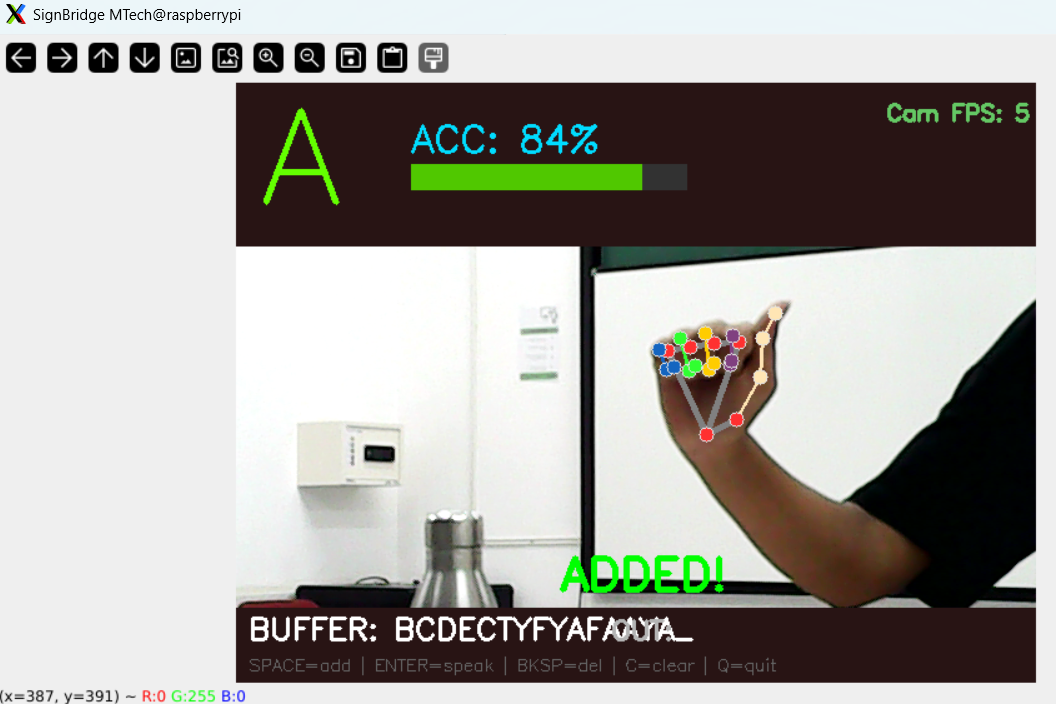
8. System Prototype (Pictures / Figures)
Note: The figures below describe the UI layout and pipeline. Actual hardware photos and screenshots should be inserted here from your project documentation.
Figure 1 — Live UI Layout:
┌─────────────────────────────────────────────────┐
│  [TOP PANEL]                                    │
│   B          ACC: 87%  [████████░░] (green)    │
│  (3.5× font) Confidence bar                     │
│                                                 │
│   ┌─── Webcam feed + MediaPipe skeleton ──────┐ │
│   │                                           │ │
│   │         Locking: 0.8s / 1.5s             │ │
│   │         [████████░░░░░░░] progress bar    │ │
│   │                                           │ │
│   └───────────────────────────────────────────┘ │
│                                                 │
│  [BOTTOM PANEL]                                 │
│   BUFFER: BRIDGE_   OUT: SIGN BRIDGE IS READY   │
│   SPACE=add | ENTER=speak | BKSP=del | C=clear  │
└─────────────────────────────────────────────────┘
Figure 2 — System Architecture Diagram:
  ┌──────────┐    ┌──────────────┐    ┌──────────────────┐
  │  Webcam  │───►│  MediaPipe   │───►│  Wrist-Relative  │
  │ 640×480  │    │  Hands (21   │    │  Normalisation   │
  │  30 FPS  │    │  landmarks)  │    │  → 63-dim vector │
  └──────────┘    └──────────────┘    └────────┬─────────┘
                                               │
                                               ▼
                                    ┌──────────────────┐
                                    │  Random Forest   │
                                    │  Classifier      │
                                    │  (100 trees)     │
                                    └────────┬─────────┘
                                             │
                                    [Conf ≥ 75%]
                                             │
                                             ▼
                                    ┌──────────────────┐
                                    │  Dwell Timer     │
                                    │  State Machine   │
                                    │  (1.5 s hold)    │
                                    └────────┬─────────┘
                                             │
                                             ▼
                                    ┌──────────────────┐
                                    │  Word Buffer     │
                                    │  + Sentence Out  │
                                    └────────┬─────────┘
                                             │
                                             ▼
                                    ┌──────────────────┐
                                    │  eSpeak TTS      │
                                    │  (non-blocking)  │
                                    └──────────────────┘
Insert actual prototype photos and screenshots here (e.g., hand detection overlay, dwell timer in action, spoken word output).
9. Conclusions & Limitations
Key Outcomes
- SignBridge successfully demonstrates a fully offline, real-time ASL finger-spelling recognition pipeline running on commodity CPU hardware with no cloud dependency.
- The Random Forest classifier, trained on wrist-normalised MediaPipe landmarks, achieves strong accuracy (typically 92–98%) across 26 ASL letter classes with sub-2ms inference latency per frame.
- The dwell-timer input mechanism proves effective at eliminating accidental letter entries while maintaining a natural signing pace.
- The end-to-end system — from hand sign to spoken word — operates within a 30 FPS real-time budget with comfortable headroom.
Limitations
- Static finger-spelling only: The system does not recognise dynamic or motion-based ASL signs (e.g., J, Z which require movement), limiting coverage to static poses.
- Single-hand only: Configured for one hand; two-handed signs or full ASL word signs are not supported.
- Dataset size and diversity: The in-house dataset, while functional, is limited in speaker diversity, skin tone variation, and background variety. This may reduce generalisation to new users.
- No continuous sign recognition: The dwell-timer approach requires deliberate pausing between letters; it does not support fluent, continuous signing speed.
- Lighting sensitivity: MediaPipe detection quality degrades significantly under poor or highly variable lighting conditions.
- Fixed vocabulary: The model only classifies A–Z. Digits, punctuation, and common ASL words are not covered.
10. Future Work
- Dynamic sign support: Extend to motion-based ASL gestures (J, Z, and full word signs) using an LSTM or Temporal Convolutional Network over sequences of landmark frames.
- Expanded vocabulary: Train on ASL digits (0–9), common phrases, and eventually the full ASL vocabulary using a larger, publicly available dataset (e.g., ASL-LEX, MS-ASL).
- Continuous recognition: Replace the dwell-timer with a sliding-window sequence classifier to support natural, fluent signing without pausing between letters.
- Raspberry Pi / Jetson deployment: Port the pipeline to a dedicated edge board. The Random Forest’s low RAM and CPU requirements make this straightforward; MediaPipe has official ARM builds.
- Two-handed sign support: Extend the feature vector to include both hands (2 × 63 = 126 features) for broader ASL coverage.
- User adaptation / personalisation: Implement incremental data collection per user to fine-tune the model for individual hand shapes and signing styles.
- Mobile deployment: Export the model to ONNX or TensorFlow Lite for deployment in a mobile app (Android/iOS) using the device camera.
- Larger, diverse dataset: Collaborate with a broader group of signers across different backgrounds, lighting conditions, and hand sizes to improve real-world generalisation.
11. Challenges & Mitigation
| Challenge | Description | Mitigation |
|---|---|---|
| Landmark normalisation | Raw landmark coordinates vary with hand position, distance, and user, making the classifier unstable | Subtracted wrist landmark (index 0) from all landmarks to produce a position-invariant, relative feature vector |
| Accidental letter entry | Early prototype added letters on any high-confidence frame, causing rapid unintended input | Implemented a 1.5-second dwell-timer state machine (locked_letter, hold_start_time, last_added_letter) requiring sustained, stable holds |
| TTS blocking the video loop | Synchronous eSpeak calls froze the OpenCV window during speech synthesis | Replaced with subprocess.Popen (non-blocking) so TTS runs in a separate process while the inference loop continues uninterrupted |
| Camera latency on Linux | Default OpenCV VideoCapture introduced frame buffering lag on V4L2 devices | Switched to explicit V4L2 backend, MJPEG codec, 30 FPS cap, and disabled autofocus to minimise capture-to-inference latency |
| Visually similar ASL signs | Several letter pairs (M/N, R/U, D/F) share similar hand shapes, causing misclassifications | Identified problem classes from the confusion matrix and conducted targeted re-collection sessions with more samples for those classes |
| Inconsistent detection under poor lighting | MediaPipe detection confidence dropped below 0.7 in dim or high-glare environments | Set min_detection_confidence=0.7 and min_tracking_confidence=0.5 as practical thresholds; documented lighting guidance in README |
| Dataset imbalance | Initial collection produced uneven sample counts across letters (easier letters recorded more often) | Enforced a per-letter recording discipline during data collection sessions; README recommends 100–200 samples per class |
| X11/VNC window rendering | OpenCV default fixed-size window did not resize correctly on remote Linux sessions | Used cv2.WINDOW_NORMAL and explicit resizeWindow(1024, 768) for compatibility with VNC-forwarded displays |
12. References
-
MediaPipe Hands — Google LLC.
MediaPipe Solutions — Hand Landmark Detection.
https://google.github.io/mediapipe/solutions/hands.html -
scikit-learn: Machine Learning in Python — Pedregosa et al., 2011.
Journal of Machine Learning Research, 12, pp. 2825–2830.
https://scikit-learn.org/ -
OpenCV — Open Source Computer Vision Library.
https://opencv.org/ -
eSpeak Text-to-Speech Synthesiser — Jonathan Duddington.
http://espeak.sourceforge.net/ -
Random Forests — Breiman, L. (2001).
Machine Learning, 45(1), 5–32.
https://doi.org/10.1023/A:1010933404324 -
American Sign Language Finger-Spelling Reference — Lifeprint / ASLU.
https://www.lifeprint.com/asl101/pages-layout/handshapes.htm -
MediaPipe Python API Documentation.
https://developers.google.com/mediapipe/api/solutions/python/mp -
NumPy — Harris, C.R. et al. (2020).
Nature, 585, 357–362.
https://numpy.org/ -
pandas: Powerful Python Data Analysis Toolkit.
https://pandas.pydata.org/ -
Project Repository — Shruti Jain et al., IISc Bengaluru.
https://github.com/1024shrutijain-design/Sign_Language_recognition_system.git