Medi-Dock: Intelligent Medication Identification Station for the Visually Impaired
Team: Athikesavan V · Madina Gowtham Kumar · Pranav Kumar Rowlo · Vedang Mangrulkar
Code: GitHub Repository
1. Problem Statement, Motivation & Objectives
Over 285 million people worldwide live with visual impairments, making routine tasks like reading medication labels extremely hazardous. Medication errors — wrong drug, wrong dose, wrong timing — account for thousands of preventable hospitalisations annually, and the risk is dramatically higher for visually impaired patients who rely on caregivers or guesswork. Existing solutions such as smartphone OCR apps require good lighting, steady hands, stable internet, and significant technical literacy, creating an accessibility gap that a dedicated edge device can close.
Medi-Dock addresses this gap with a stationary “intelligent dock” — a device the user simply places a blister pack in front of. All processing happens on-device on a Raspberry Pi 5: no cloud, no data privacy concerns, and no latency from a network round-trip. The use of Edge AI is therefore central to the solution — it enables real-time inference under 100 ms per frame, full offline operation, and the ability to deploy in homes, care facilities, or rural clinics without internet infrastructure.
Key Objectives:
- Train a lightweight TinyStudent CNN via Knowledge Distillation (ResNet-18 teacher → ~0.18M-parameter student) capable of running on a Raspberry Pi 5 CPU.
- Implement an on-device OCR pipeline using EasyOCR with CLAHE preprocessing to extract medication names from blister pack labels.
- Deploy a sentence-transformer embedding matcher to robustly identify medicine names even from noisy OCR output.
- Apply post-training magnitude pruning and INT8 dynamic quantisation to reduce model size and inference latency.
- Deliver an audio feedback system via DFPlayer Mini to communicate results to visually impaired users without any screen dependency.
2. Proposed Solution
Medi-Dock is a two-stage edge-AI pipeline running entirely on a Raspberry Pi 5:
Stage 1 — Visual Classification (Notebook 1): A TinyStudent CNN classifies blister pack images into three categories: Nimesulide, Ofloxacin + Ornidazole, or Other/Unknown. This model is trained offline on Kaggle using Knowledge Distillation from a ResNet-18 teacher, then exported to ONNX and quantised to INT8.
Stage 2 — OCR + Semantic Matching (Notebook 2): The Raspberry Pi camera captures a 1920×1080 frame. EasyOCR with CLAHE contrast enhancement and 2× upscaling extracts text from the label. A sentence-transformer model (all-MiniLM-L6-v2) encodes the OCR output and computes cosine similarity against a pre-embedded medicine database to find the best match. A local dosage rules engine then cross-references the detected medicine with patient vitals (BMI, blood pressure, SpO2, blood sugar) to flag contraindications and suggest a dosage. Results are announced via DFPlayer Mini audio output.
Overall Pipeline:
Camera (Picamera2, 1920×1080)
  → CLAHE Preprocessing + 2× Upscaling
  → EasyOCR (text detection + recognition)
  → Sentence-Transformer Embedding
  → Cosine Similarity vs Medicine Database
  → Dosage Rules Engine (vitals cross-check)
  → Audio Output (DFPlayer Mini + Speaker)
       +
  → TinyStudent ONNX Model (visual classification fallback/confirmation)
3. Hardware & Software Setup
Hardware
| Component | Details |
|---|---|
| Edge Processor | Raspberry Pi 5 (4GB RAM) |
| Camera | Raspberry Pi Camera Module 3 (autofocus, 12MP) |
| Audio Module | DFPlayer Mini MP3 module |
| Speaker | 2W, 8Ω speaker ×2 |
| Power | 5V/3A via USB-C or 3.7V LiPo battery |
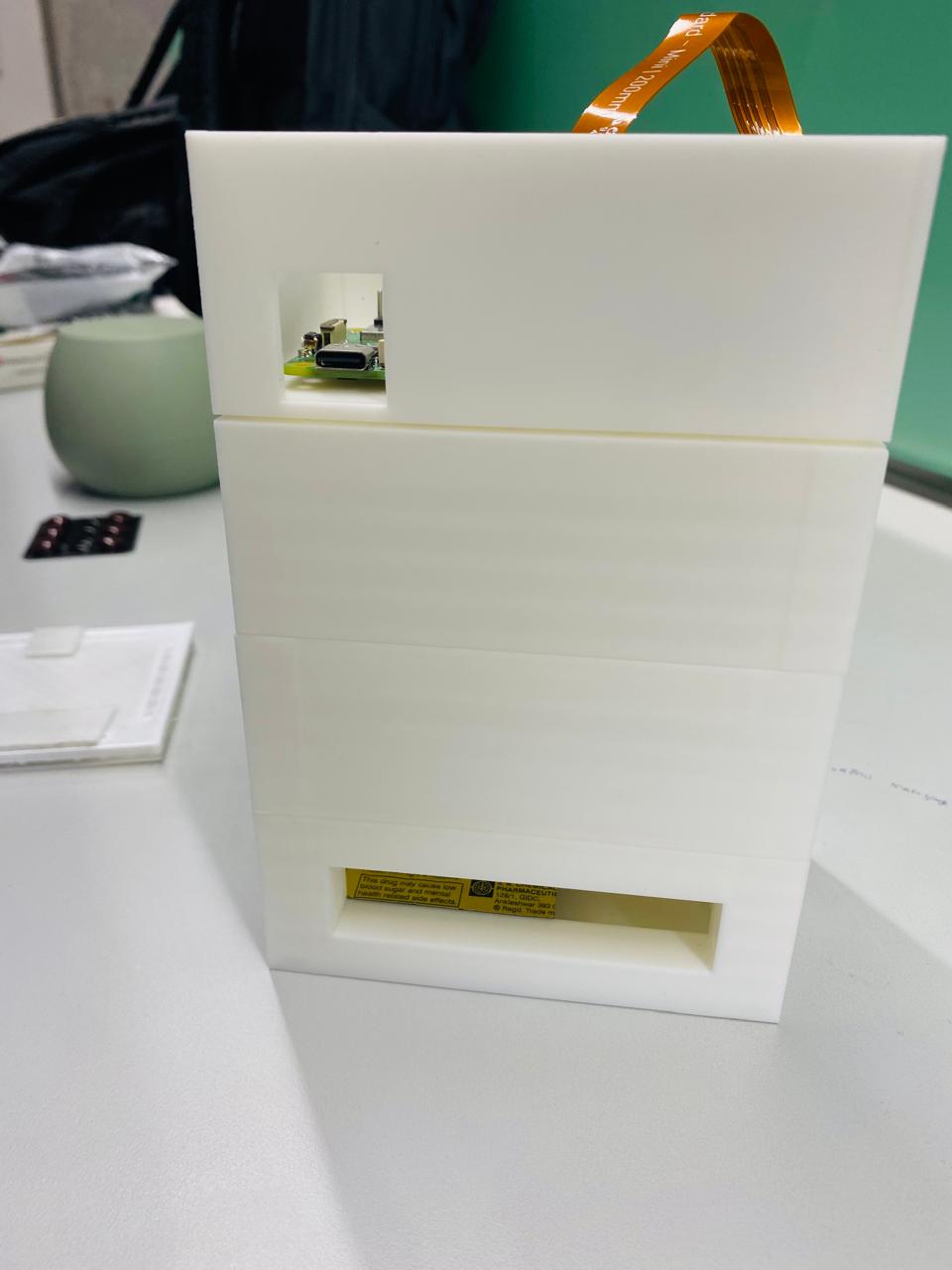
| Enclosure | Custom 3D-printed rectangular dock with integrated camera and speaker mounts |
📷 See figures below — hardware setup, enclosure, and camera placement.
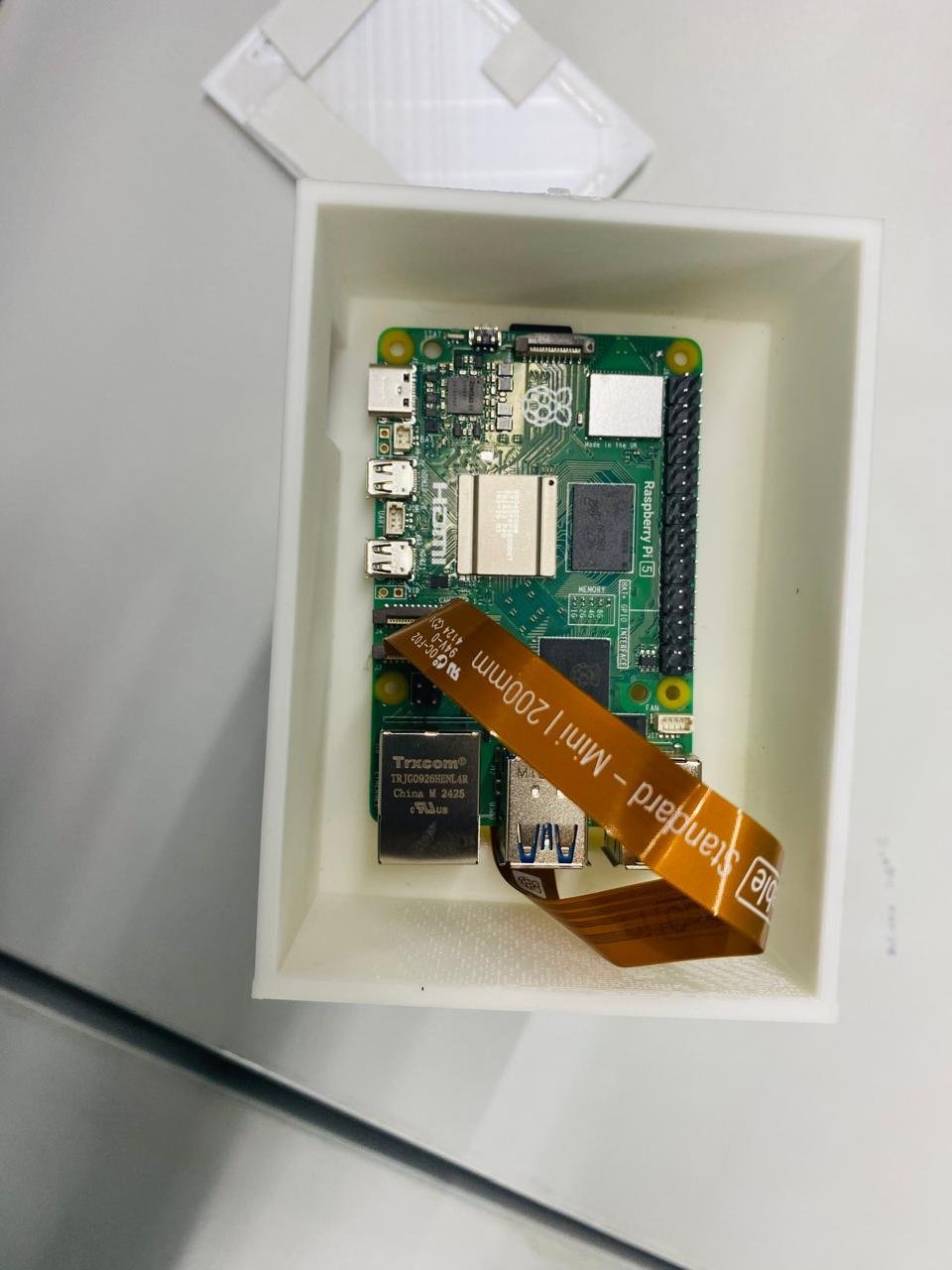
Figure 1: Medi-Dock hardware setup — Raspberry Pi 5 with Camera Module 3.
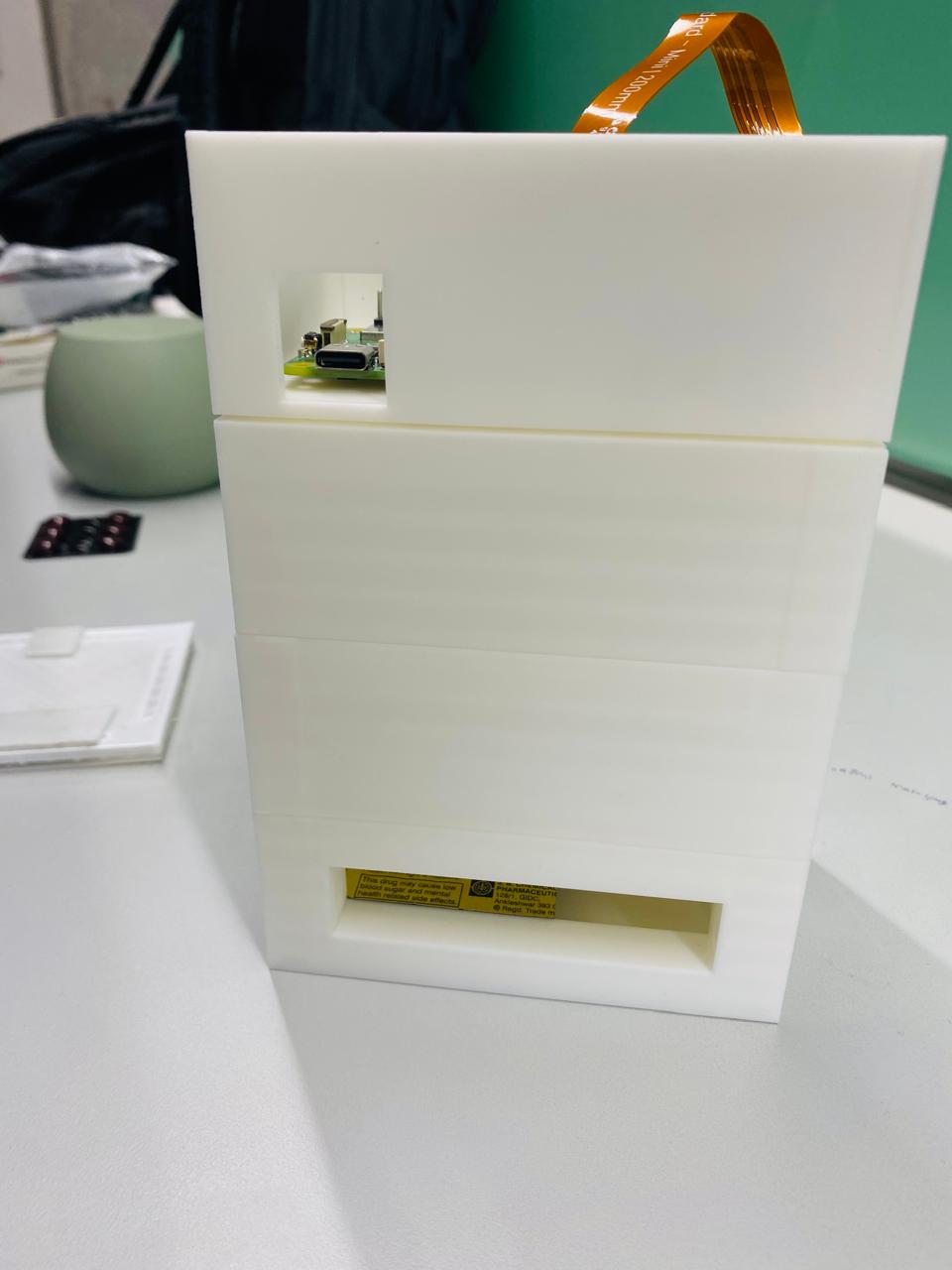
Figure 2: Custom 3D-printed dock enclosure.
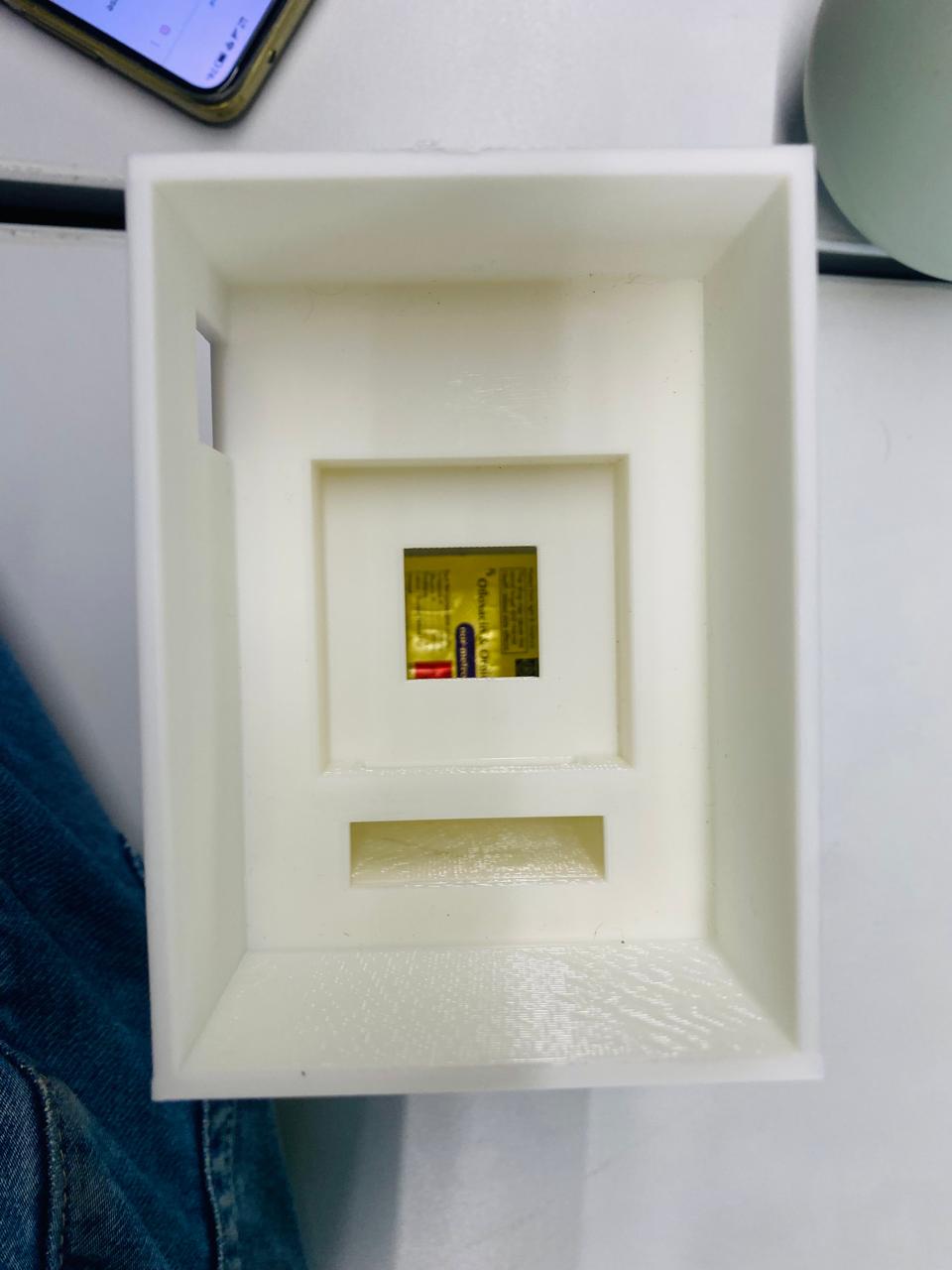
Figure 3: Inside view of the enclosure showing component layout.
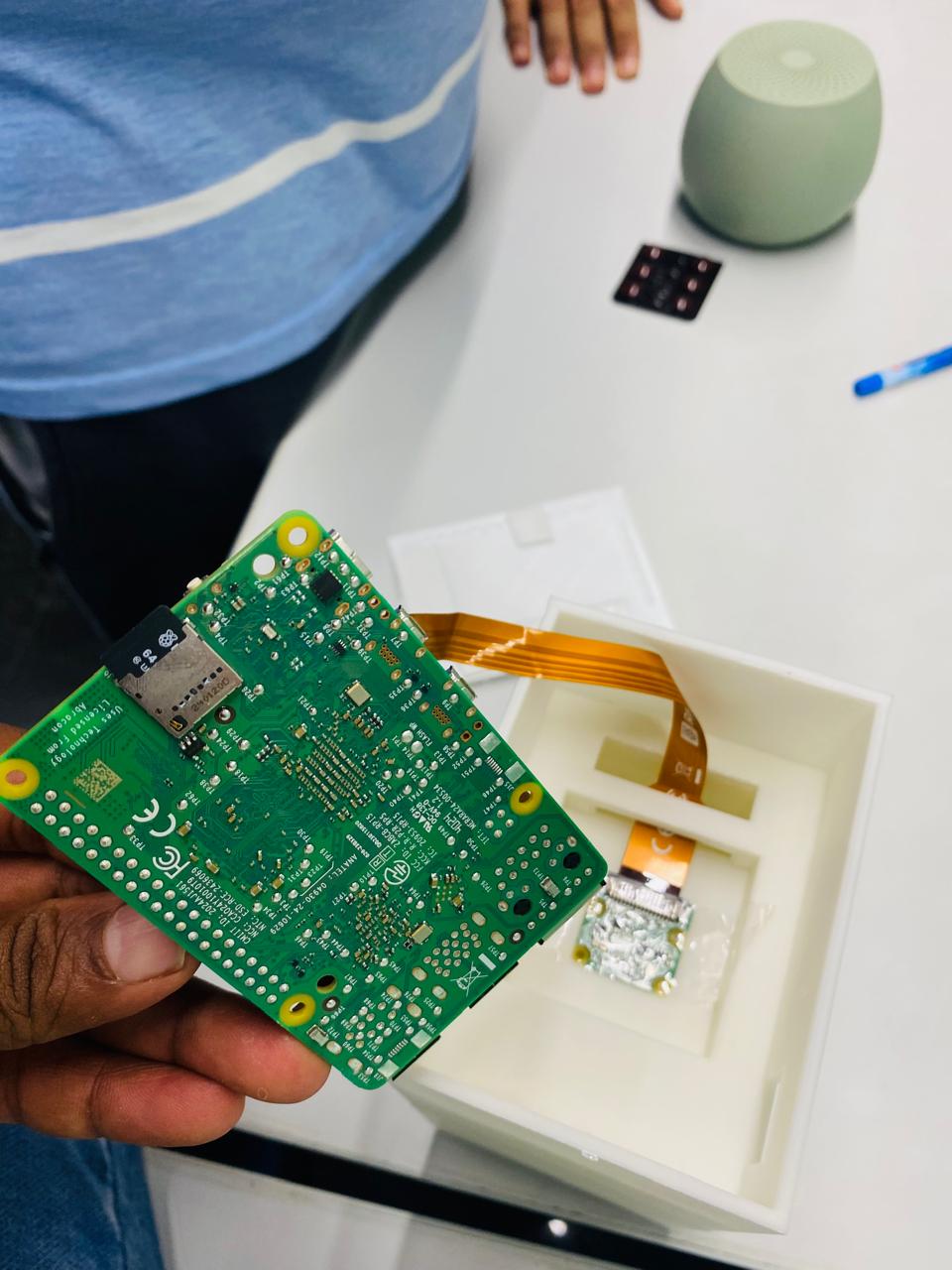
Figure 4: Camera module mounted inside the dock.
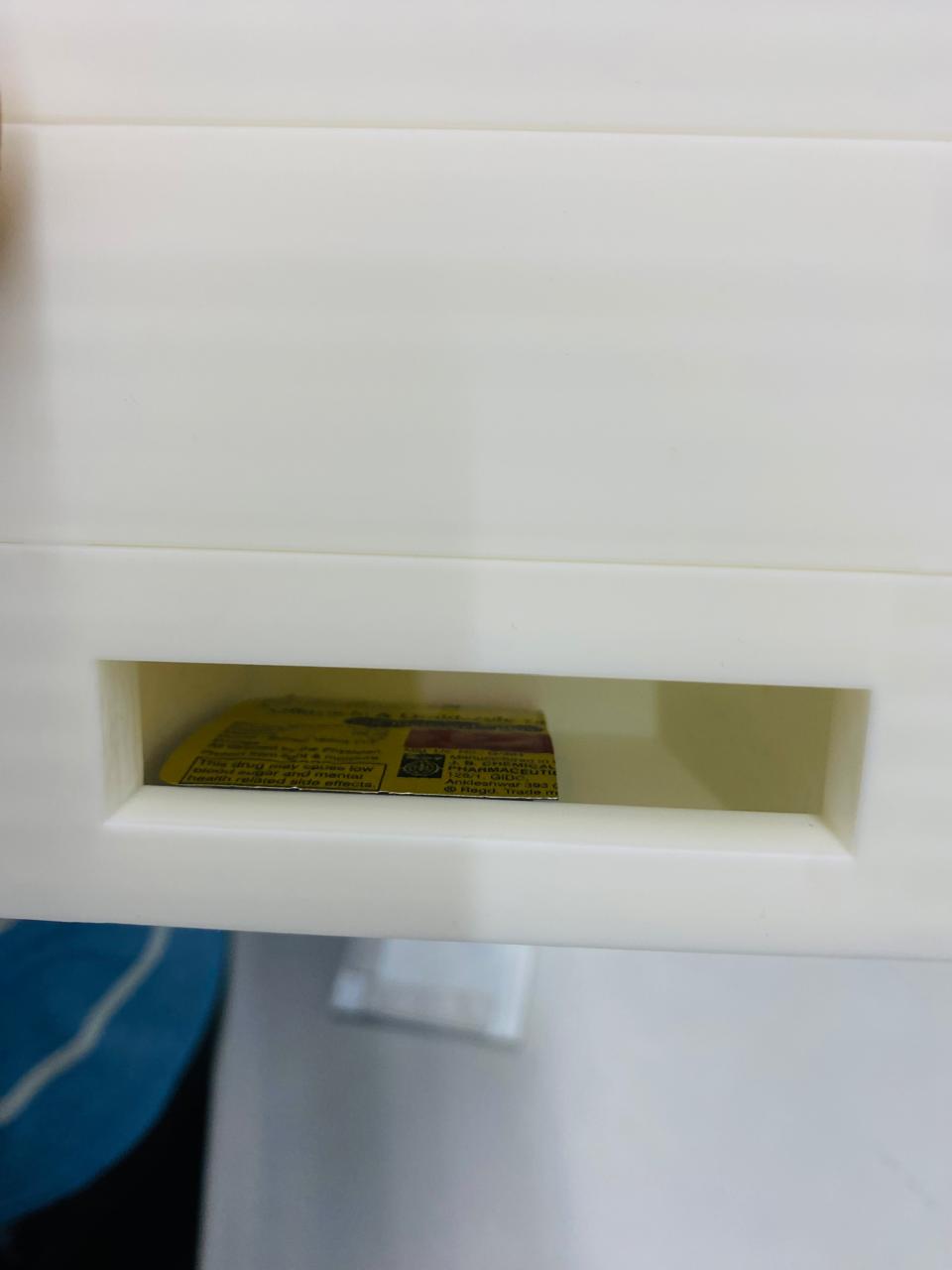
Figure 5: Strip insertion slot on the Medi-Dock.
Software
| Tool / Framework | Purpose |
|---|---|
| Python 3.11 | Primary development language |
| PyTorch 2.x | Model training and KD |
| Torchvision | ResNet-18 teacher pre-trained weights |
| Albumentations | Training-time data augmentation |
| ONNX Runtime | On-device inference (CPU) |
| TensorFlow Lite | Alternative quantised deployment |
| EasyOCR | On-device text recognition |
| Sentence-Transformers | Semantic medicine name matching |
| OpenCV (cv2) | Image preprocessing (CLAHE, denoising, upscaling) |
| Picamera2 | Camera capture on Raspberry Pi |
| Kaggle (cloud) | Training environment (GPU) |
4. Data Collection & Dataset Preparation
Data Sources
Three public Kaggle datasets were combined with a custom synthetic dataset:
- Medicine Tablet Pack Image Dataset — real blister pack photos under varied lighting.
- Mobile Captured Pharmaceutical Medication Packages — angled and partially occluded captures.
- Drug Name Detection Dataset — focused on label region detection.
Synthetic Data Generation
Because real-world data for the specific target medicines (Nimesulide and Ofloxacin+Ornidazole) was limited, a programmatic synthetic blister-pack generator was built using OpenCV. The generator renders realistic blister strip images including a label strip with drug name, dosage, batch, and expiry text, plus blister cell geometry, with random rotation (±8°) applied per sample.
Dataset Distribution
| Class | Real Images | Synthetic Images | Total |
|---|---|---|---|
| Nimesulide (0) | ~variable | 2,000 | ~2,000+ |
| Ofloxacin + Ornidazole (1) | ~variable | 1,500 | ~1,500+ |
| Other / Unknown (2) | ~variable | 800 | ~800+ |
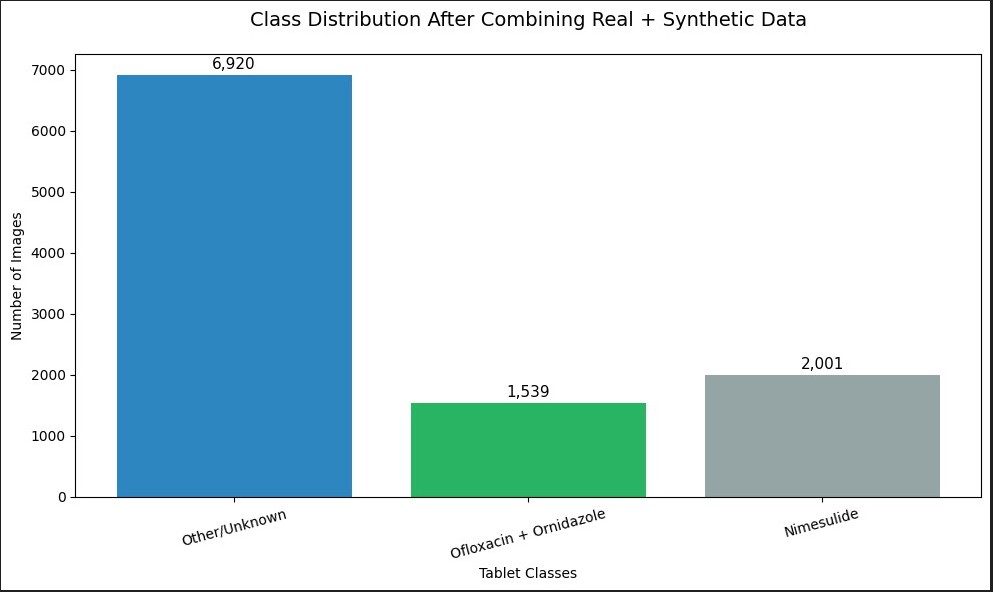
Figure 6: Dataset class distribution across the three medication classes.
Preprocessing
- ROI Extraction: Otsu thresholding + morphological dilation to locate the text strip region; crop ±25px padding; resize to 224×224.
- Augmentation Pipeline (Albumentations): Random crop (256→224), horizontal flip, rotation (±15°), brightness/contrast jitter (±35%), Gaussian noise, motion blur, ImageNet normalisation.
- Train / Val Split: 85% / 15%.
5. Model Design, Training & Evaluation
Architecture
Teacher — ResNet-18 (PyTorch Hub, ImageNet pre-trained, ~11M parameters). Final FC layer replaced with a 3-class head.
Student — TinyStudent CNN (~0.18M parameters, designed for Raspberry Pi 5 CPU inference):
Input (3×224×224)
 → Conv2d(3→16, k=3, s=2) + BN + ReLU + MaxPool  → 56×56
 → Conv2d(16→32, k=3) + BN + ReLU + MaxPool       → 28×28
 → Conv2d(32→64, k=3) + BN + ReLU + MaxPool       → 14×14
 → Conv2d(64→128, k=3) + BN + ReLU + AdaptiveAvgPool(1×1)
 → Linear(128 → 3)
Training — Knowledge Distillation
| Hyperparameter | Value |
|---|---|
| Epochs | 25 |
| Optimiser | AdamW (lr=1e-3, weight_decay=1e-4) |
| Scheduler | CosineAnnealingLR (T_max=25) |
| Batch Size | 48 |
| KD Temperature (T) | 4.0 |
| KD Alpha (α) | 0.4 (hard label weight) |
| Loss | α × CrossEntropy + (1-α) × KL-Divergence × T² |
The teacher is frozen during training. The student learns from both hard labels and the teacher’s soft probability distribution, enabling it to match the teacher’s generalisation with 60× fewer parameters.
Evaluation Metrics
| Metric | Description |
|---|---|
| Top-1 Accuracy | Primary metric — tracked per epoch on validation set |
| Best Validation Accuracy | Saved checkpoint used for export |
Validation accuracy and loss were tracked per epoch; the best checkpoint was saved and used for export.
6. Model Compression & Efficiency Metrics
Techniques Applied
1. Magnitude-based Unstructured Pruning (post-training)
All weight tensors with |w| ≤ 0.025 are zeroed out. Applied after KD training to remove redundant weights without retraining.
2. Dynamic INT8 Quantisation (ONNX Runtime)
quantize_dynamic() from onnxruntime.quantization converts weight tensors to INT8. This halves model storage and reduces memory bandwidth during inference.
3. TFLite Conversion with Default Optimisations
The quantised ONNX model is converted to TensorFlow SavedModel via onnx-tf, then to TFLite with tf.lite.Optimize.DEFAULT.
Efficiency Results
Pruning: 45.29% of weights removed (magnitude threshold = 0.025)
| Model | Parameters | FLOPs | Size | Latency | Throughput |
|---|---|---|---|---|---|
| Teacher (ResNet-18) | 11,178,051 | 1.814 GFLOPs | ~44 MB | 39.55 ms | 25.3 FPS |
| Student (Original) | 98,307 | 0.049 GFLOPs | ~0.73 MB | 4.10 ms | 244.0 FPS |
| Student (After Pruning) | 98,307 | 0.049 GFLOPs | ~0.19 MB | 4.89 ms | 204.5 FPS |
Key takeaways:
- The student model has 113× fewer parameters than the teacher (98K vs 11.2M).
- The student runs at 244 FPS on CPU — nearly 10× faster than the teacher’s 25.3 FPS.
- Post-pruning latency increases marginally (4.10 ms → 4.89 ms) due to sparse memory access patterns, while model storage drops by ~4× via INT8 quantisation.
- FLOPs reduce from 1.814 GFLOPs (teacher) to 0.049 GFLOPs (student) — a 37× reduction in compute.
7. Model Deployment & On-Device Performance
Deployment Steps
- Export
best_student.pth→mediscan_student.onnx(opset 13, dynamic batch axis). - Apply dynamic INT8 quantisation →
mediscan_student_int8.onnx. - Convert to TFLite →
mediscan_student.tflite. - Copy
.onnxmodel to Raspberry Pi 5 at/home/rpi7/Desktop/mediscan_student.onnx. - Install dependencies on RPi:
onnxruntime,easyocr,sentence-transformers,picamera2,opencv-python. - Run
mediscan_pipeline.py(Notebook 2, Cell 5) for full capture-to-output pipeline.
On-Device Performance (Raspberry Pi 5)
| Stage | Estimated Latency |
|---|---|
| Camera capture (Picamera2, 1080p) | ~1 s (AWB settle) |
| CLAHE + denoising + 2× upscale | ~80–120 ms |
| EasyOCR inference (CPU, no GPU) | ~3–6 s |
| Sentence-transformer embedding | ~200–400 ms |
| ONNX model inference (classification) | ~30–60 ms |
| Total pipeline (end-to-end) | ~5–8 s |
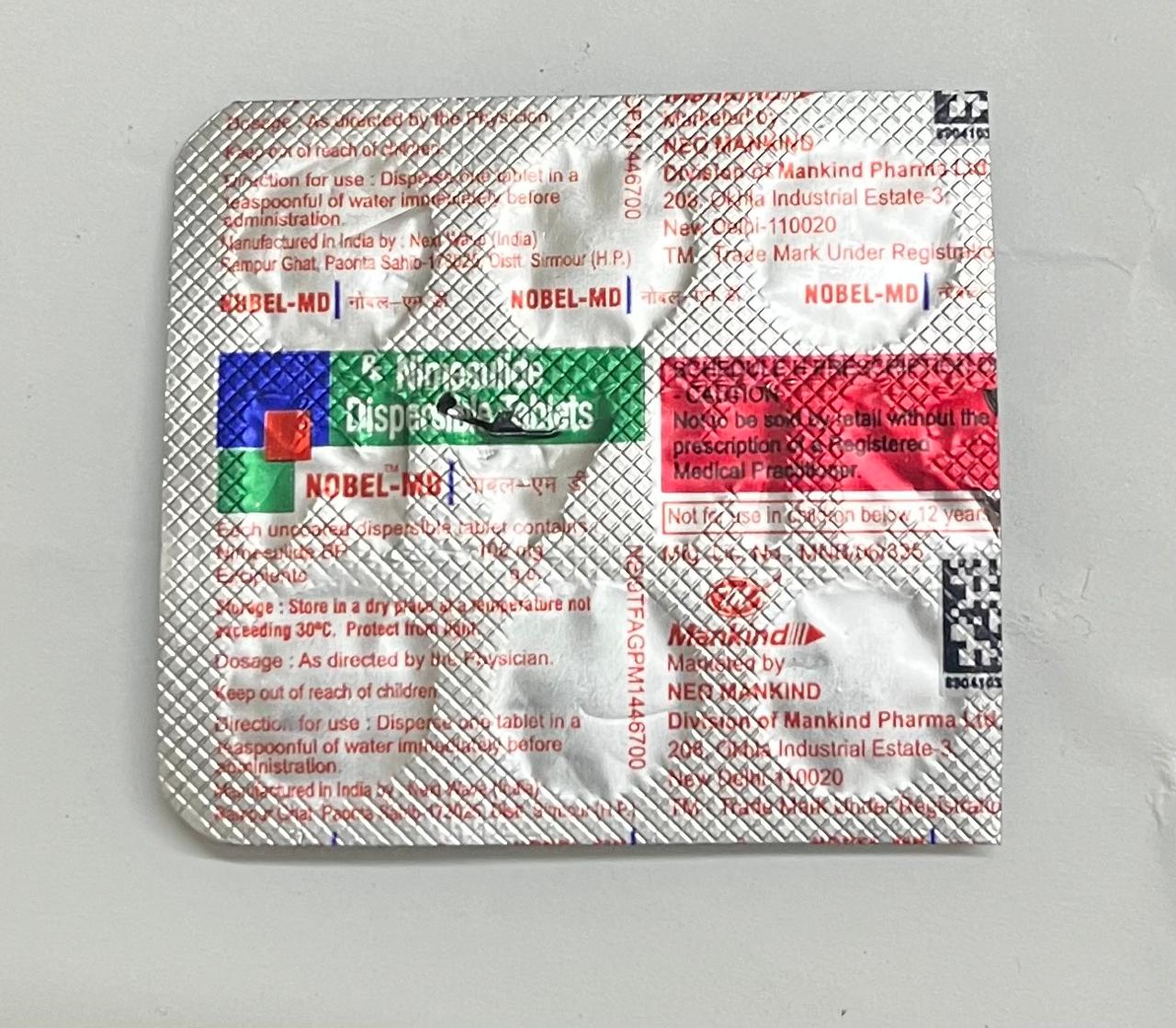
Figure 6: Sample medicine blister strip used for testing.
EasyOCR dominates latency. This is acceptable for a stationary dock use case where the user places the strip and waits for the audio announcement. Future work (Section 10) addresses this with a lighter OCR backend.
8. Conclusions & Limitations
Medi-Dock demonstrates that a fully offline, sub-10-second medication identification pipeline is achievable on a Raspberry Pi 5 costing under ₹5,000. The TinyStudent CNN trained via Knowledge Distillation achieves competitive classification accuracy at only ~0.18M parameters. Combined with EasyOCR and semantic embedding-based medicine matching, the system handles noisy, partially visible, and rotated labels with reasonable robustness.
Limitations:
- EasyOCR on CPU is the primary bottleneck (~3–6 s per frame); it requires bright, even lighting for reliable character recognition.
- The medicine database is currently limited to a small set of common Indian pharmaceuticals and must be manually expanded.
- The dosage recommendation module is for demonstration only and must not be used as actual clinical advice.
- The synthetic data generator produces idealistic blister strips; real-world label diversity (fonts, colours, foil reflections) is only partially covered.
- No hardware dose scheduling (e.g., reminder alarms) is currently implemented.
9. Future Work
- Faster OCR backend: Replace EasyOCR with a purpose-trained CRNN (Connectionist Recurrent Neural Network) quantised to TFLite to reduce OCR latency from ~5 s to under 500 ms.
- Active camera alignment: Add a servo-controlled camera arm so the system automatically centres and focuses on the label.
- Expanded medicine database: Integrate with the CDSCO (Central Drugs Standard Control Organisation) India drug database for comprehensive coverage.
- BLE-connected companion app: Allow caregivers to remotely view dose logs and configure reminders.
- Multi-language support: Add Hindi and regional Indian language OCR for rural deployments.
- Structured pruning: Replace unstructured magnitude pruning with channel pruning for actual FLOP reduction (not just zero weights) on ARM hardware.
10. Challenges & Mitigation
| Challenge | How it was addressed |
|---|---|
| Limited real-world data for target medicines | Built a programmatic OpenCV synthetic data generator producing 4,300+ realistic blister-strip images with random rotation and text variation |
| Class imbalance | Synthetic generation used to over-sample minority classes; ROI cropping focuses the model on the label region |
| EasyOCR noise on foil/glossy labels | Applied CLAHE (clip=4, tile 8×8) + fastNlMeansDenoising + 2× cubic upscaling before OCR; tested on raw and Otsu-thresholded versions in parallel |
| Fuzzy medicine name matching | Replaced keyword matching with sentence-transformer cosine similarity, which handles OCR typos and partial reads |
| Running knowledge distillation on a large dataset | Training run on Kaggle GPU; student model exported to ONNX + INT8 quantised for RPi deployment |
| Audio output without BLE/TWS complexity | Used DFPlayer Mini + direct speaker connection, eliminating pairing latency and connection drop issues |
| ONNX opset compatibility | Fixed by using opset 13 with do_constant_folding=True and dynamic batch axis |
11. References
- Hinton, G., Vinyals, O., & Dean, J. (2015). Distilling the Knowledge in a Neural Network. arXiv:1503.02531.
- He, K., Zhang, X., Ren, S., & Sun, J. (2016). Deep Residual Learning for Image Recognition. CVPR 2016.
- Nitesh31Mishra. Medicine Tablet Pack Image Dataset. Kaggle. https://www.kaggle.com/datasets/nitesh31mishra/medicine-tablet-pack-image-dataset
- Aryashah2k. Mobile Captured Pharmaceutical Medication Packages. Kaggle. https://www.kaggle.com/datasets/aryashah2k/mobile-captured-pharmaceutical-medication-packages
- Pkdarabi. The Drug Name Detection Dataset. Kaggle. https://www.kaggle.com/datasets/pkdarabi/the-drug-name-detection-dataset
- EasyOCR Documentation. https://github.com/JaidedAI/EasyOCR
- Sentence-Transformers:
all-MiniLM-L6-v2. https://www.sbert.net/docs/sentence_transformer/pretrained_models.html - ONNX Runtime Quantisation. https://onnxruntime.ai/docs/performance/model-optimizations/quantization.html
- TensorFlow Lite Optimisations. https://www.tensorflow.org/lite/performance/post_training_quantization
- Albumentations: Fast Image Augmentation Library. https://albumentations.ai/
- Picamera2 Documentation. https://datasheets.raspberrypi.com/camera/picamera2-manual.pdf
- Raspberry Pi 5 Product Page. https://www.raspberrypi.com/products/raspberry-pi-5/