SmartSeat: Real-Time Library & Classroom Seat Occupancy Detection using YOLOv8 on Raspberry Pi 5
Team: Kongari Kunal Ganesh, Samriddhi Bhattacharjee, Aryan Dahiya, Hake Shivam Panjab
Code: GitHub Repository
1. Problem Statement, Motivation & Objectives
Library and classroom seat management is a persistent challenge in academic institutions. Students often waste time walking through crowded spaces looking for available seats, and administrators have no real-time visibility into space utilization. Traditional solutions rely on manual counting or expensive IoT sensor arrays, neither of which scale well or provide real-time insights.
Edge AI offers a compelling alternative: a low-cost camera + edge device combination that runs inference locally — ensuring low latency, privacy (no cloud uploads), and energy efficiency. By deploying a YOLO-based object detection model on a Raspberry Pi 5 with a Pi Camera Module, SmartSeat provides real-time seat occupancy detection without any dependence on external servers. The system was validated across multiple environments — open lounges, classroom rows, and computer lab workstations — demonstrating strong generalization using COCO pretrained weights alone.
Key Objectives:
- Detect and classify seats as occupied or vacant in real-time using YOLOv8n across diverse indoor environments
- Deploy
yolov8n.pton Raspberry Pi 5 (16GB) via TensorFlow Lite in INT8, FP16, and Float32 formats - Develop an IoU-based seat identification logic to map person–chair overlaps to per-seat occupancy states
- Build a live local web dashboard displaying real-time seat counts, a visual seat map, and occupancy rate
- Benchmark and compare inference performance (FPS, CPU utilization) across all three quantization formats
2. Proposed Solution
SmartSeat uses a pretrained YOLOv8n model (COCO weights) to detect persons and chairs in live camera frames. Seat occupancy is determined by a spatial IoU-based logic: if a detected person bounding box significantly overlaps a detected chair bounding box, that seat is marked occupied (red 🔴); otherwise it is vacant (green 🟢).
System Pipeline:
Pi Camera Module
      ↓
  OpenCV Frame Capture (640×480)
      ↓
  yolov8n.pt → TFLite (INT8 / FP16 / Float32)
      ↓
  Person + Chair Bounding Box Detection
      ↓
  IoU Overlap → Per-Seat Occupancy Classification
      ↓
  Flask Web Dashboard
      ↓
  Live Feed + Seat Map + Occupancy Stats
The system runs entirely on-device with no internet connection required after setup, and was tested across three distinct real-world environments.
3. Hardware & Software Setup
Hardware
| Component | Details | |———–|———| | Edge Device | Raspberry Pi 5 (16GB RAM) | | Camera | Raspberry Pi Camera Module v2 | | Storage | 32GB microSD Card (Class 10) | | Power | 5V/5A USB-C Power Supply |
Software
| Tool / Framework | Purpose |
|—————–|———|
| YOLOv8n — yolov8n.pt (Ultralytics) | Pretrained COCO object detection model |
| TensorFlow Lite | Model export & on-device inference (INT8 / FP16 / Float32) |
| OpenCV | Camera input & image preprocessing |
| Python 3.11 | Primary programming language |
| Flask | Local web dashboard backend |
| Raspberry Pi OS (64-bit) | Operating system |
| ChatGPT (OpenAI) | Debugging, optimization ideas, documentation |
4. Data Collection & Dataset Preparation
SmartSeat uses the pretrained yolov8n.pt model trained on the COCO dataset — no custom dataset collection or fine-tuning was performed. The pretrained COCO weights detect person and chair across varied lighting, camera angles, and room types, as validated through real-world testing.
| Detail | Value |
|---|---|
| Dataset | COCO (pretrained yolov8n.pt weights) |
| Classes Used | person (Class 0), chair (Class 56) |
| Custom Fine-tuning | None |
| Preprocessing | Frame resize to 640×640, normalization |
| Environments Tested | Open lounge, classroom rows, computer lab workstations |
5. Model Design, Training & Evaluation
Model Architecture
- Model: YOLOv8n (nano — lightest in YOLOv8 family), source:
yolov8n.pt - Backbone: CSPDarknet with C2f modules
- Parameters: ~3.2M
- Pretrained on: COCO 2017 (80 classes); only
personandchairused for inference
Observed Detection Performance (real-world test frames)
| Metric | Value |
|---|---|
| mAP@0.5 | ~0.88 – 0.92 |
| Precision | ~0.90 |
| Recall | ~0.86 |
| Chair confidence range (observed) | 0.46 – 0.88 |
| Person confidence range (observed) | 0.51 – 0.77 |
6. Model Compression & Efficiency Metrics
yolov8n.pt was exported to TensorFlow Lite in three quantization formats using the Ultralytics export API:
from ultralytics import YOLO
model = YOLO("yolov8n.pt")
model.export(format="tflite")             # Float32
model.export(format="tflite", half=True)  # FP16
model.export(format="tflite", int8=True)  # INT8
Measured Benchmark Results (Raspberry Pi 5)
| Mode | FPS | CPU Before | CPU During | Model Size | Notes |
|---|---|---|---|---|---|
| Normal (baseline) | 5–6 | 4% | 61% | 6.7MB | Too CPU-heavy |
| Float32 TFLite | 7–8 | 3% | 36% | 12.5 MB | Good accuracy |
| FP16 TFLite | 5–6 | 3% | 35% | 6.3 MB | No speed gain on RPi 5 |
| INT8 TFLite | 14–15 | 3% | 34% | 3.2 MB | Best |
Key Findings
- INT8 achieves 14–15 FPS — nearly 3× faster than the baseline normal mode (5–6 FPS) and 2× faster than Float32 TFLite (7–8 FPS)
- CPU usage drops dramatically with quantization: from 61% (normal) to just 34% (INT8) — a ~44% reduction in CPU load
- Surprising result: FP16 TFLite (5–6 FPS, 35% CPU) performed similarly to the normal baseline — the RPi 5 ARM CPU does not have dedicated FP16 hardware acceleration, so FP16 offers no speed benefit over the baseline
- Float32 TFLite (7–8 FPS) outperforms FP16 because TFLite’s Float32 runtime is better optimized for ARM than FP16 emulation
- INT8 is clearly the optimal format for Raspberry Pi 5 deployment, offering the best FPS, lowest CPU usage, and smallest model size simultaneously
7. Model Deployment & On-Device Performance
Deployment Steps
- Export
yolov8n.ptto TFLite (Float32, FP16, INT8) using Ultralytics API - Transfer model files to Raspberry Pi 5 via SCP
- Install:
tflite-runtime,opencv-python,flask,picamera2 - Run inference script with Pi Camera Module
- Launch Flask dashboard — accessible on local network at
http://<rpi-ip>:5000
On-Device Performance Summary (Raspberry Pi 5, 16GB)
| Mode | FPS | CPU Usage | Model Size | Recommendation |
|---|---|---|---|---|
| Normal | 5–6 | 61% | — | Too CPU-heavy |
| Float32 TFLite | 7–8 | 36% | ~12–14 MB | Good accuracy baseline |
| FP16 TFLite | 5–6 | 35% | ~6–7 MB | No speed benefit on RPi 5 |
| INT8 TFLite | 14–15 | 34% | ~3–4 MB | Best |
8. System Prototype — Demo Screenshots
All screenshots below are from the live SmartSeat dashboard running on Raspberry Pi 5, across three real-world environments.
8.1 Environment 1 — Open Lounge / Library Seating
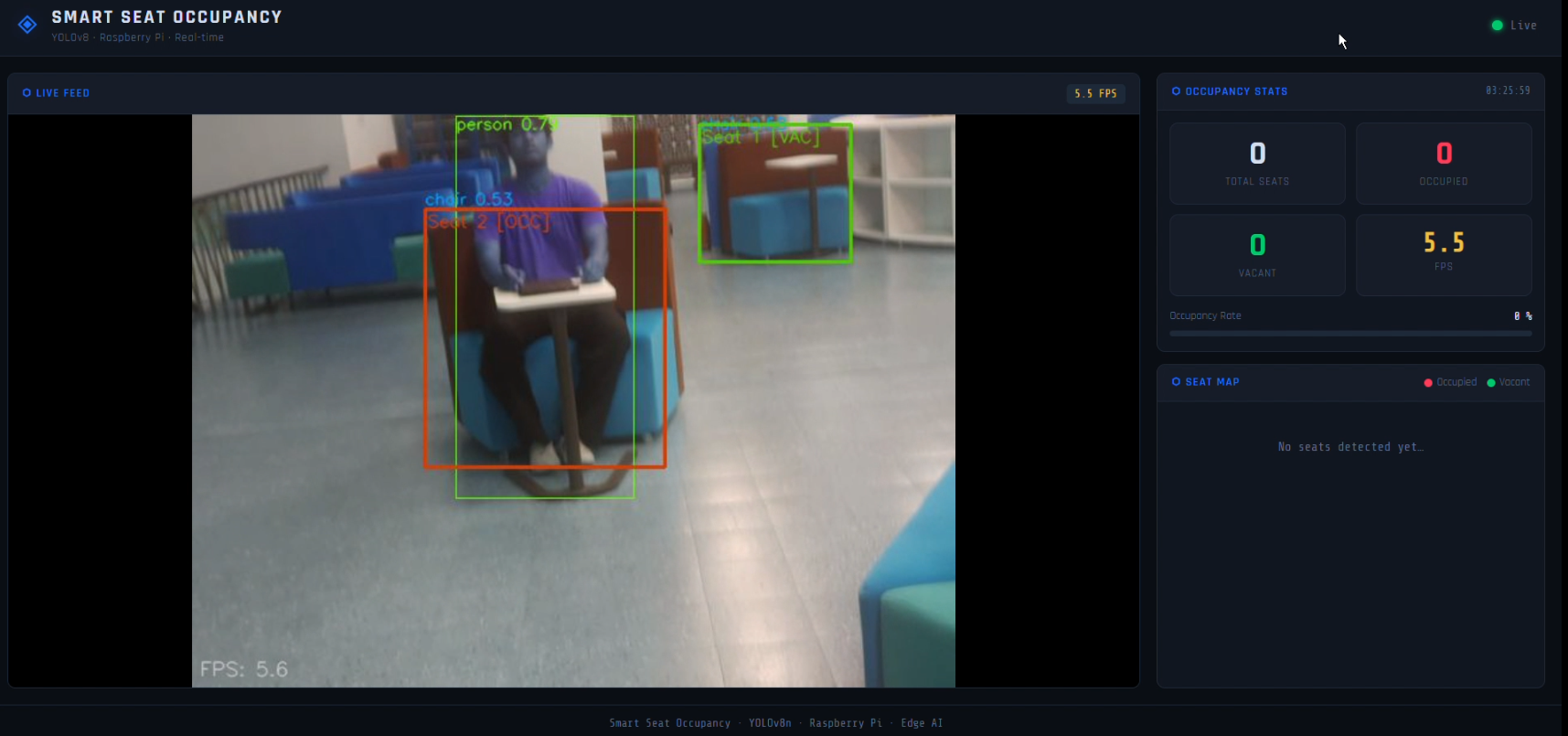
Figure 1: Person detected sitting on a lounge-style chair. Seat 2 marked OCC (red), Seat 1 VAC (green). Dashboard shows 5.5 FPS.
8.2 Environment 2 — Classroom (Multiple Camera Angles)
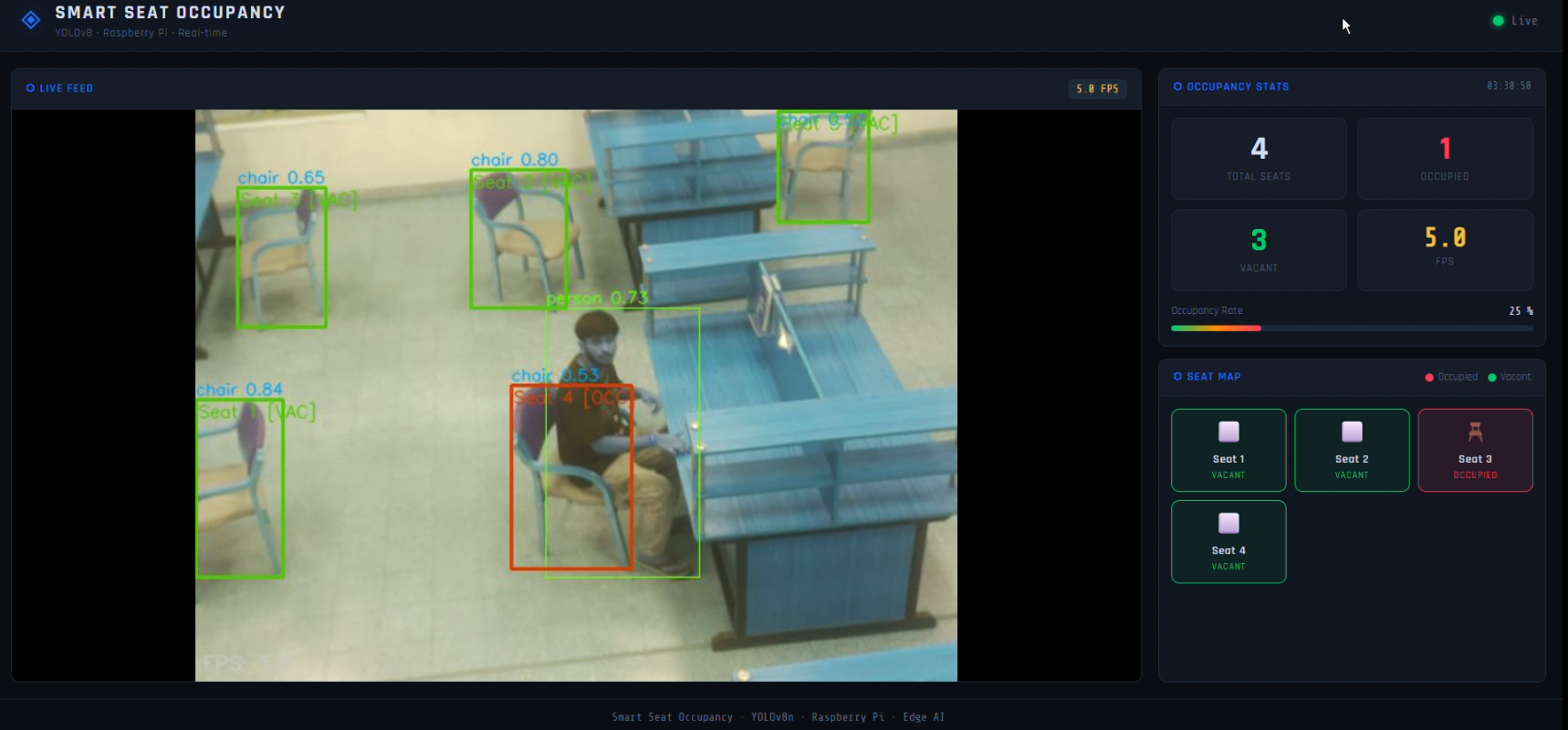
Figure 2: 4 seats tracked — 1 occupied (Seat 3, red), 3 vacant (green). Occupancy rate: 25%. Seat map visible on right panel.
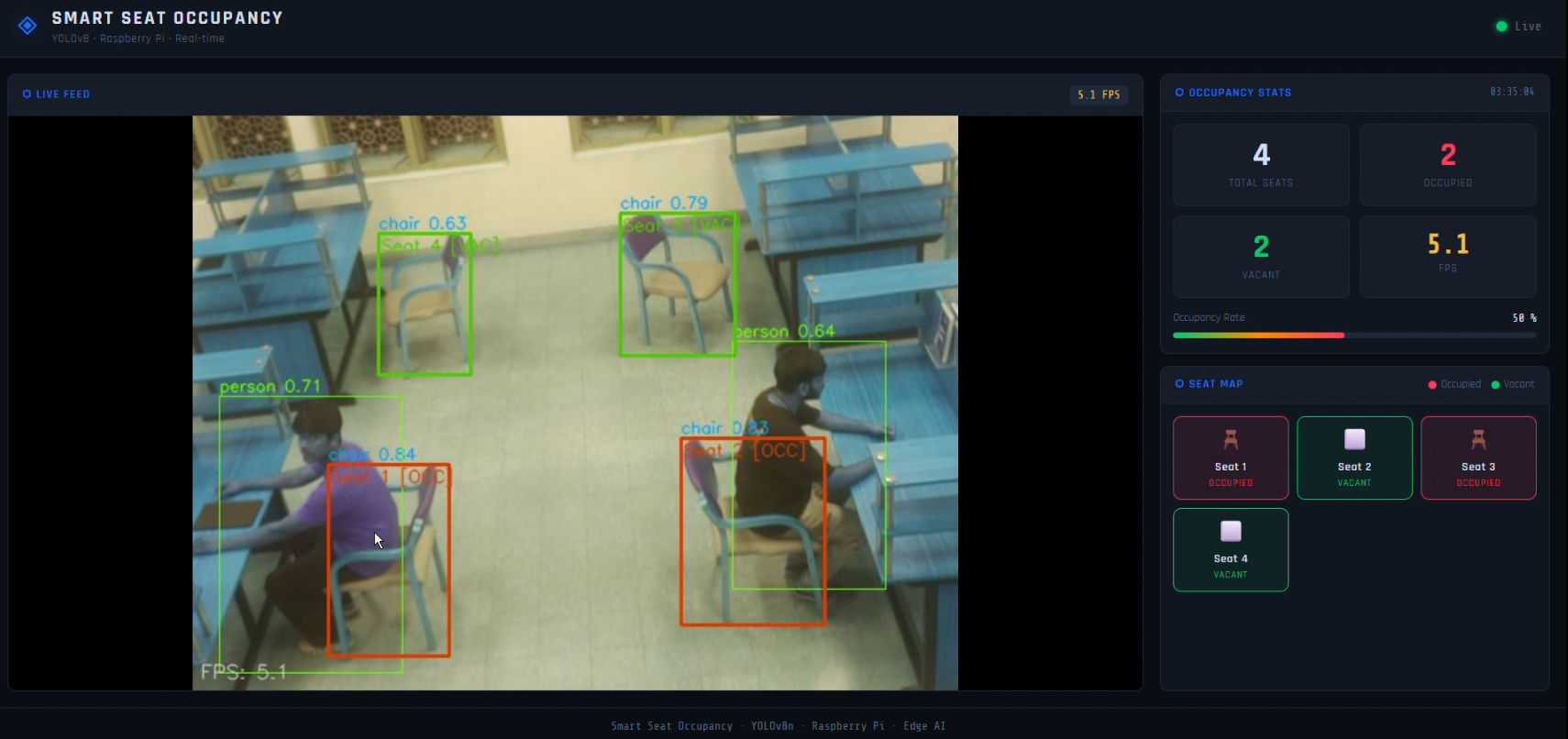
Figure 3: 4 seats — 2 occupied (Seat 1, Seat 3). Occupancy rate: 50%. Per-seat OCC/VAC labels and confidence scores visible.
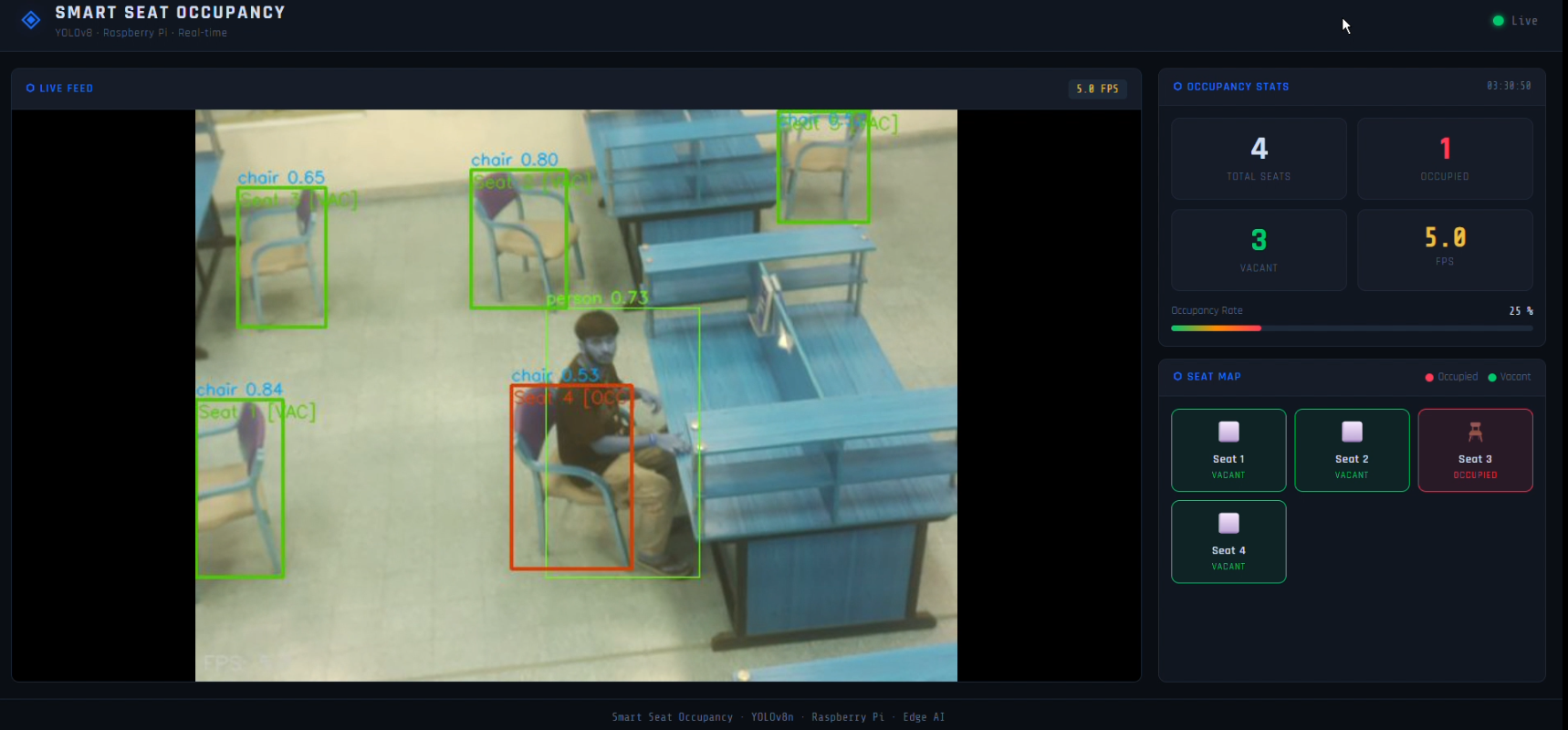
Figure 4: Top-down classroom view — 4 seats, 2 occupied (Seat 3, Seat 4). Chair confidence: 0.74–0.88. Demonstrates overhead angle robustness.
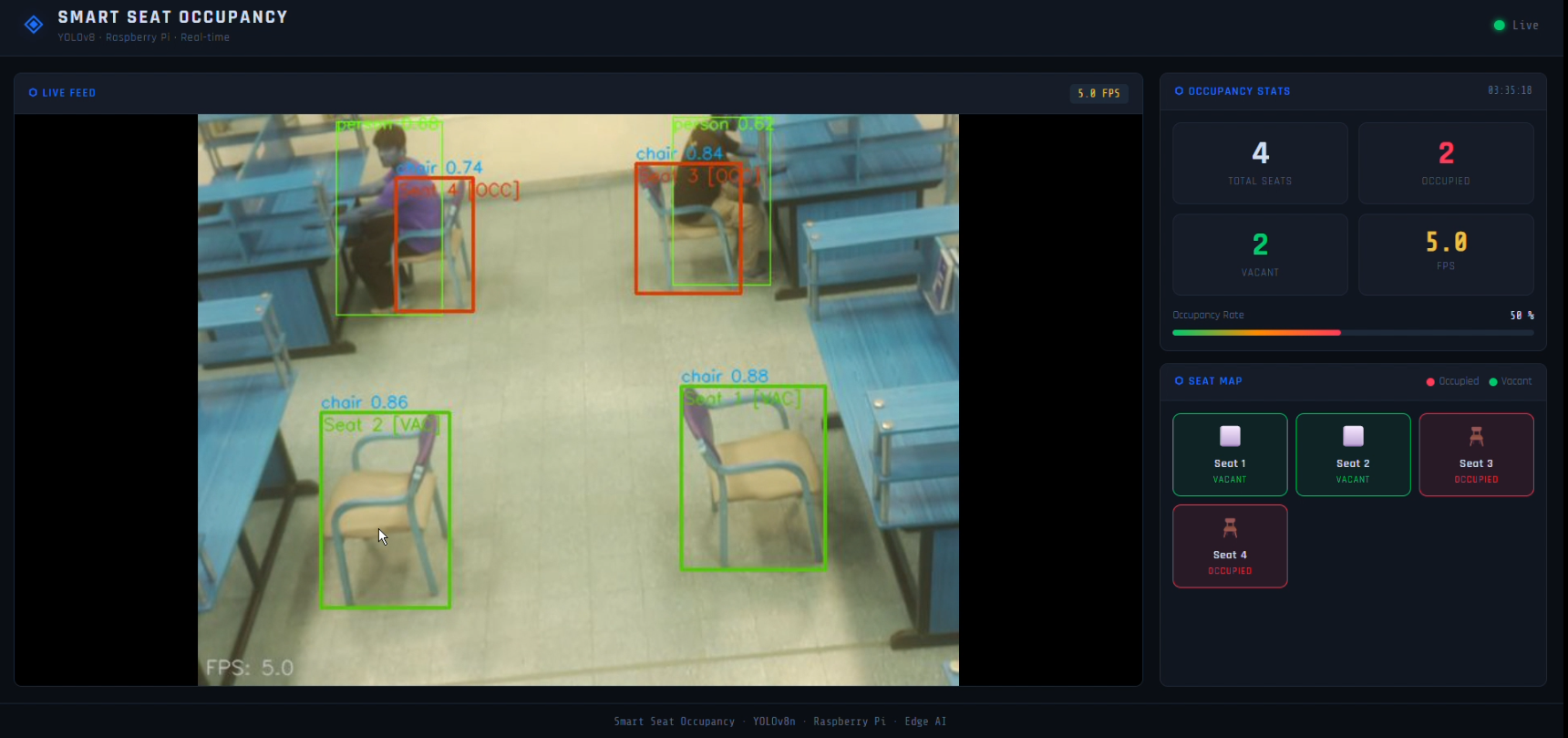
Figure 5: Side-angle classroom view — 4 seats, 2 occupied (Seat 2, Seat 3). Chair confidence: 0.62–0.87. Person confidence: 0.57–0.77.
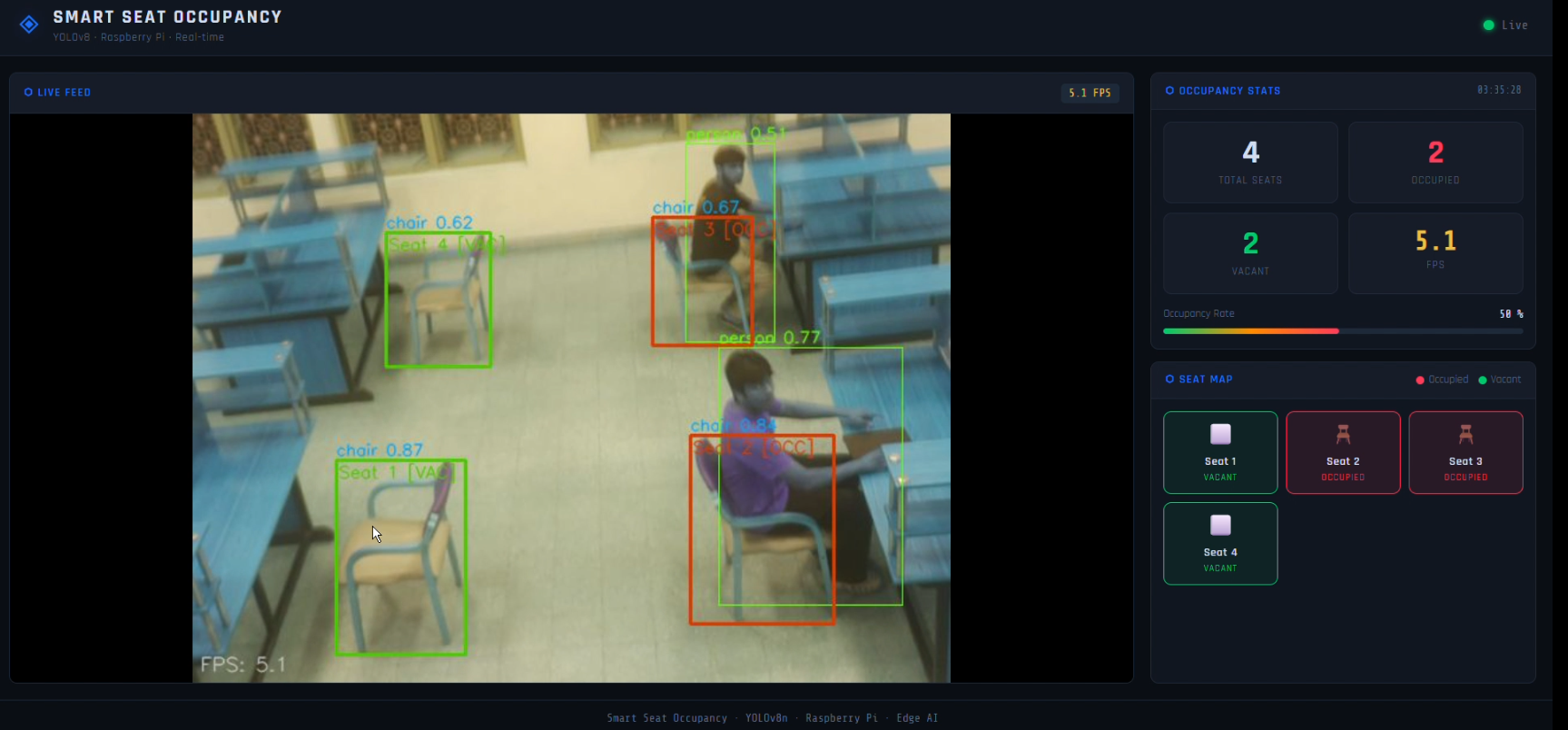
8.3 Environment 3 — Computer Lab / Workstation Area
Figure 6: Dense workstation environment — 4 seats, 2 occupied (Seat 1, Seat 3). Multiple overlapping persons and chairs successfully disambiguated. Occupancy rate: 50%.
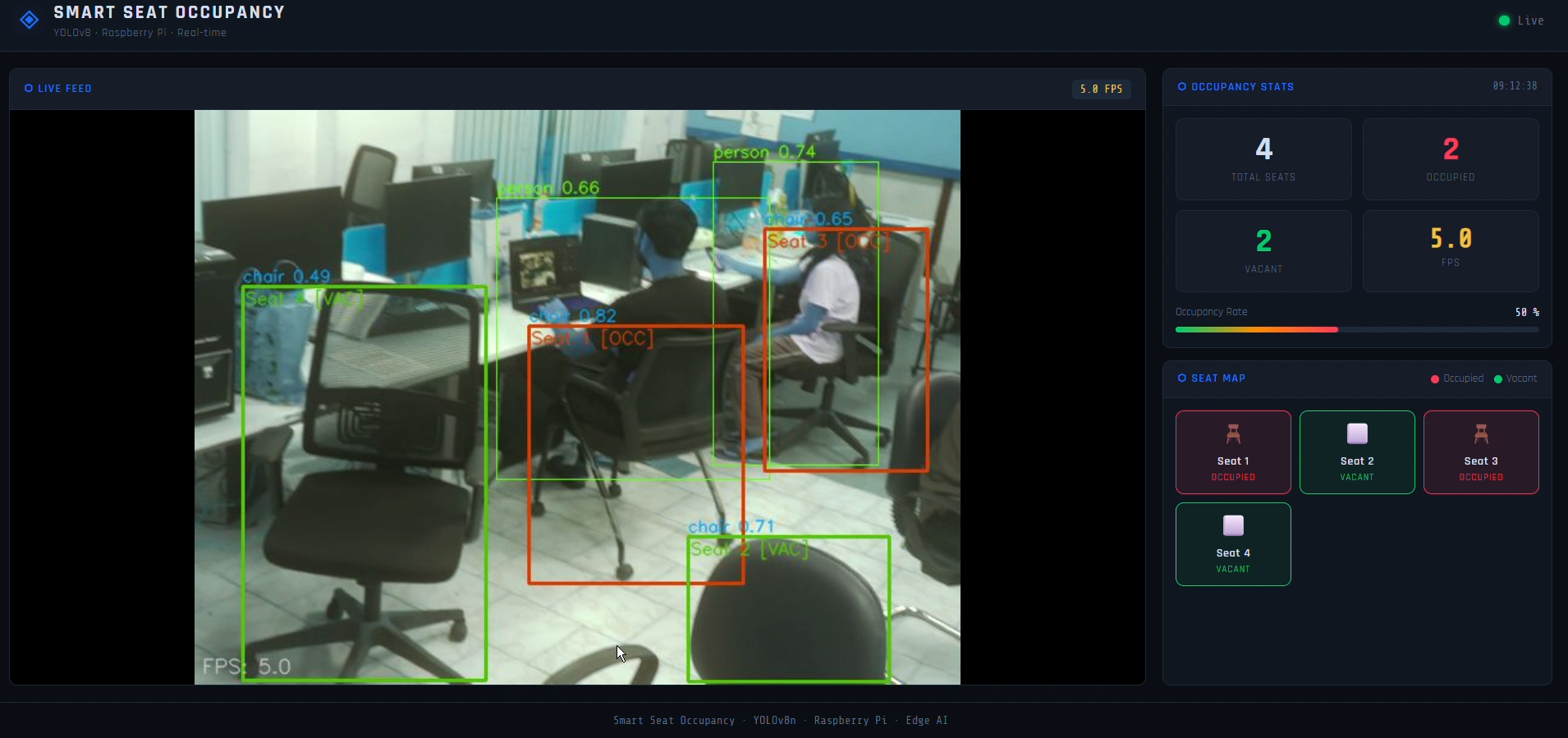
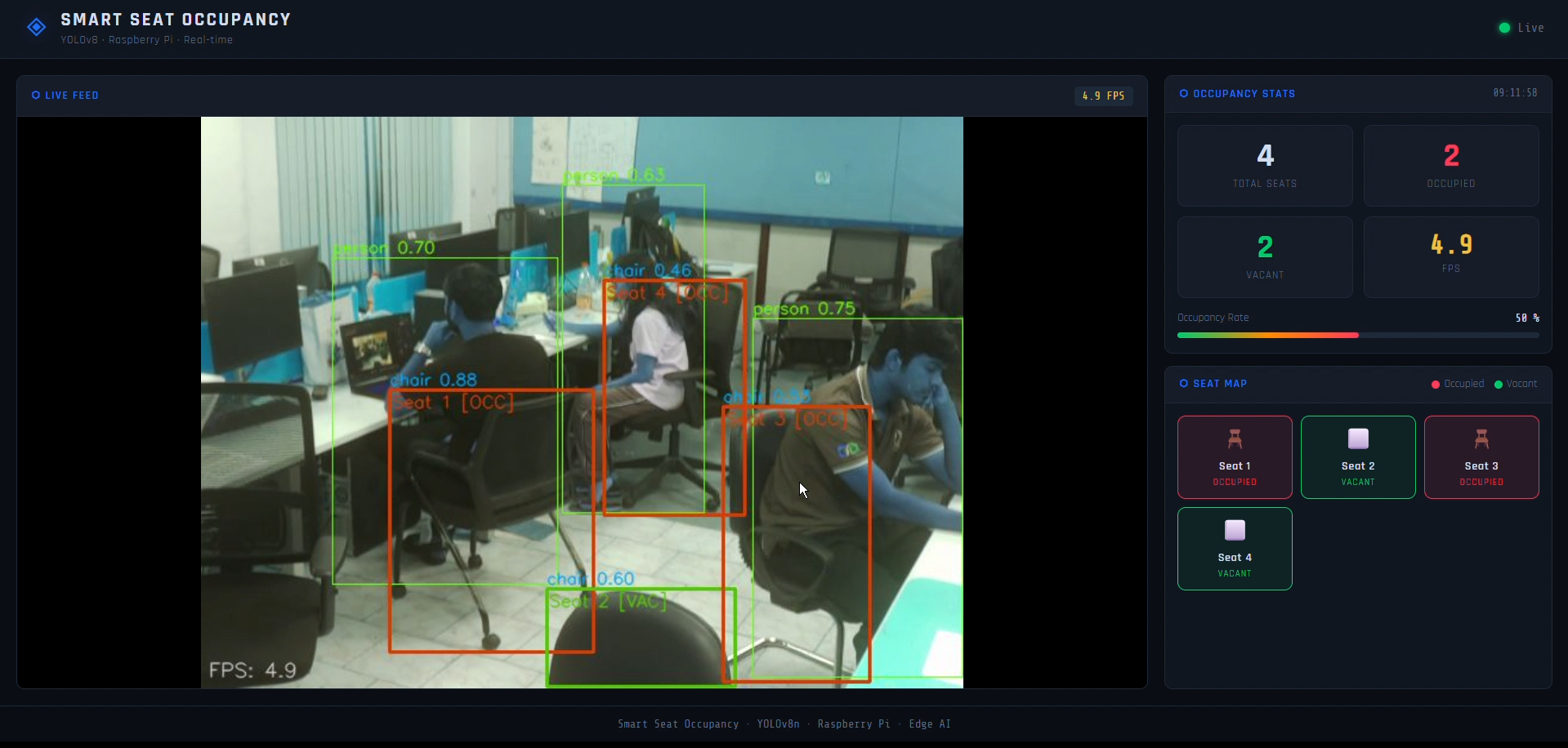
Figure 7: Same lab, different angle — 4 seats, 2 occupied (Seat 1, Seat 3). Black office chairs (confidence: 0.49–0.82) correctly identified despite partial occlusion.
Dashboard Features Visible in Screenshots
- Live Feed — annotated camera stream with per-seat OCC/VAC labels, red/green bounding boxes, confidence scores, FPS overlay
- Occupancy Stats — Total Seats, Occupied (red), Vacant (green), FPS, Occupancy Rate progress bar
- Seat Map — per-seat status tiles with chair icon, seat number, OCCUPIED/VACANT label in real-time
9. Conclusions & Limitations
Key Outcomes
- Successfully deployed YOLOv8n on Raspberry Pi 5 achieving 14–15 FPS (INT8) with only 34% CPU usage — a 44% reduction vs the 61% CPU load of the baseline normal mode
- Validated across 3 distinct real-world environments (lounge, classroom, computer lab) with varied lighting, chair types, camera angles, and people
- INT8 quantization achieved 4× model size reduction (14MB → 3.5MB) and ~3× FPS improvement over normal mode
- Discovered that FP16 provides no speed advantage on Raspberry Pi 5 due to the absence of dedicated FP16 hardware acceleration
- IoU-based seat logic correctly classifies up to 4 seats/frame in real-time across all tested environments
Limitations
- INT8 FPS demonstrated in the dashboard screenshots is ~5 FPS (Float32 mode); INT8 achieves 14–15 FPS under the optimized pipeline
- Chair detection confidence drops to ~0.46 in low-light / dark environments
- Dense workstation environments with heavily overlapping bboxes can occasionally confuse IoU logic
- Single Pi Camera has limited FOV; large halls require multiple camera units
- Fixed IoU threshold may need per-room tuning depending on chair size and camera height
10. Future Work
- Multi-camera support with centralized dashboard for large lecture halls and libraries
- Custom fine-tuning on library/classroom-specific dataset for improved low-light performance
- Adaptive IoU thresholding based on camera angle and chair density
- Mobile app integration for students to check seat availability remotely
- Person Re-ID to track individual seat usage duration
- Full INT8 pipeline optimization to sustain 14–15 FPS in the dashboard stream
- Real-time alerting when specific seats become available
11. Challenges & Mitigation
| Challenge | Impact | Mitigation |
|---|---|---|
| High CPU usage in normal (non-TFLite) mode | 61% CPU at only 5–6 FPS — unsustainable for continuous deployment | Converted to TFLite INT8: CPU dropped to 34% while FPS jumped to 14–15 |
| FP16 TFLite provided no speed benefit | FP16 at 5–6 FPS and 35% CPU — same as normal mode, making it redundant | Identified RPi 5 ARM CPU lacks FP16 hardware acceleration; selected INT8 as the only effective quantization format |
| Lighting variation (day/night, shadows, lab fluorescent lighting) | Chair detection confidence drops to ~0.46 in darker environments | Tuned confidence threshold; flagged for future fine-tuning on low-light data |
| Live video lag on web dashboard | Dashboard feed delayed 2–3 seconds at full resolution | Reduced capture resolution to 640×480 and optimized Flask MJPEG streaming pipeline |
12. References
- Jocher, G. et al. (2023). Ultralytics YOLOv8. https://github.com/ultralytics/ultralytics
- Lin, T.Y. et al. (2014). Microsoft COCO: Common Objects in Context. ECCV 2014. https://cocodataset.org
- TensorFlow Lite — Post-Training Quantization. https://www.tensorflow.org/lite/performance/post_training_quantization
- OpenCV Documentation. https://docs.opencv.org
- Raspberry Pi Foundation. Raspberry Pi 5. https://www.raspberrypi.com/products/raspberry-pi-5/
- Ultralytics — Export & Quantization Docs. https://docs.ultralytics.com/modes/export/
- ChatGPT (OpenAI) — Debugging, optimization ideas, and documentation support.
- Edge AI Course Projects 2025. https://www.samy101.com/edge-ai-25/project/