AI Powered Blind Assistance device
Introduction
The project aims to develop an AI-powered assistive device that helps visually impaired individuals navigate complex environments safely and independently. The current system integrates a camera to capture visual data and detect surrounding objects and pedestrian paths in real time. The prototype is designed to eventually incorporate voice command support and auditory feedback for hands-free and accessible interaction, although these features are planned for future development. The object detection model operates efficiently on edge hardware, ensuring low-latency processing suitable for dynamic settings. The ultimate goal is to enhance the safety, mobility, and autonomy of visually impaired users by translating advanced AI capabilities into a practical, wearable tool.
Globally, over 285 million people are visually impaired, many of whom struggle with navigating unfamiliar or obstacle-filled environments. Traditional mobility aids like white canes or guide dogs provide limited situational awareness and cannot detect dynamic hazards or interpret complex surroundings. With recent advancements in embedded systems and edge AI, it is now possible to run lightweight machine learning models directly on portable devices, enabling real-time perception and decision-making without the need for cloud connectivity.
This project is motivated by the need to create an affordable, AI-based solution that enhances the independence and safety of blind and visually impaired individuals. By combining computer vision with real-time object detection on an edge device, the project seeks to bridge the gap between assistive needs and technological capability. The broader goal is to build a practical, user-friendly system that can evolve to include voice interaction and auditory feedback for a complete assistive experience.
Methodology
List of hardware required and their specifications:
| Hardware | Specification / Purpose |
|---|---|
| Arduino Nicla Vision | Edge AI board with onboard camera and IMU; used for real-time object detection |
| Power Bank | Portable power source for mobility |
| USB Cable | For powering and programming the Nicla Vision |
| Raspberry Pi (planned) | For converting detection output into audio feedback (future extension) |
| Speaker / Audio Module (planned) | To deliver voice-based alerts to the user (via Raspberry Pi) |
List of software used:
| Software | Function |
|---|---|
| Edge Impulse Studio | For data collection, model training, and deployment |
| OpenMV IDE | To view and debug live output from the Nicla Vision board |
| Arduino IDE | For flashing firmware and configuring the Nicla Vision board |
| Python (planned) | To implement audio processing on Raspberry Pi (in future scope) |
Data Collection
Gathering multi-modal data including real-world images (for object and pedestrian path recognition) to train and validate the models. We have collected image data samples of 10 objects including pedestrian path. Each object behaves as a single class. The objects that we have considered are: Water Bottle, Bag, Books, pedestrian path, dustbins, Human beings, Laptops, pens, shoes/sandals, and some random objects which we consider as general obstacles. Each class contains an average of 250 data samples.
| Total Samples | 2,827 images |
|---|---|
| Number of Classes | 10 |
| Class | Number of Samples |
|---|---|
| Bag | 285 |
| Book | 279 |
| Bottle | 323 |
| Clear Path | 278 |
| Dustbin | 230 |
| Human | 310 |
| Laptop | 257 |
| Obstacle | 264 |
| Pen | 338 |
| Shoes | 263 |
Once the data was collected, it was uploaded in the Edge Impulse Data Acquisition tab. Each data sample had to be labelled by creating the bounding boxes. The following image shows how the pre-processing of a single image sample was done by creating the bounding box and labelling it (Fig.1). A split of 80% (train data) - 20% (test data) was done in order to test the model for its performance (Fig.2).
Model Development and Compression
- Impulse Design Description:
The model was designed using the Edge Impulse Studio with a three-block impulse pipeline:- Input block: 48×48 grayscale image.
- Processing block: Image feature extraction.
- Learning block: Object Detection using MobileNetV2 FOMO.
The model is trained to detect 10 classes, including common obstacles and clear pedestrian paths. FOMO (Fast Object Detection) was chosen for its efficiency on edge devices like Nicla Vision, allowing real-time inference by detecting object centers instead of full bounding boxes.
-
Pre-Processing and Annotation:
Before training, each image was pre-processed and annotated with its respective class label using the Edge Impulse Studio. The image shown below is an example where the object “Obstacle” is correctly labelled, and raw and processed features are extracted for training (Fig.4). -
Feature Extraction and Class Separability:
After pre-processing, Edge Impulse’s Feature Explorer was used to visualize the high-dimensional feature space of the training data. The scatter plot below displays clusters corresponding to each of the 10 object classes. While some overlap exists between visually similar objects (e.g., bags and obstacles), most classes form well-separated clusters, indicating that the model can effectively learn discriminative features for classification (Fig.5).
- Model Training Configuration:
The model was trained using the MobileNetV2 FOMO architecture, ideal for low-latency object detection tasks on embedded devices. The training was performed using the CPU backend in Edge Impulse with the following settings:
| Parameter | Value |
|---|---|
| Training Cycles | 20 |
| Learning rate | 0.001 |
| Data Augmentation | Enabled |
| Input features | 6912 (after DSP) |
| Output classes | 10 |
Final Evaluation and Confusion Matrix
The final model, trained using the FOMO MobileNetV2 0.35 architecture, achieved a macro F1-score of 72.6% on the validation set. This indicates reasonably strong performance across most object classes, especially considering the low resolution and real-time constraints of the edge hardware. The confusion matrix (Fig.6) below summarizes classification accuracy per class.
Notably:
- High detection performance was achieved for Clear_Path (79.6%), Dustbin (89.9%), and Human (90%).
- Classes like Obstacle (42.6%) and Pen (60.8%) showed lower performance due to visual similarity or data imbalance.
- The average F1-score for all classes was 0.73.
Model Deployment
Once the model was trained and validated, it was deployed to the Arduino Nicla Vision board using Edge Impulse’s deployment tools (Fig.7). The FOMO-based model was converted to an optimized TensorFlow Lite (TFLite) int8 format, ensuring minimal memory footprint and fast inference speed.
The deployment process involved generating a firmware binary (.zip) through Edge Impulse, which was then flashed onto the Nicla Vision using the Edge Impulse CLI and/or OpenMV IDE. Once deployed, the Nicla Vision processed live image data from its onboard camera and successfully identified objects in real-time (Fig.8).
Although the device currently displays predictions via serial output (visible in OpenMV IDE), future work includes extending functionality to deliver audio-based feedback through a Raspberry Pi that interprets serial messages and converts them to speech for blind users.
Prototype
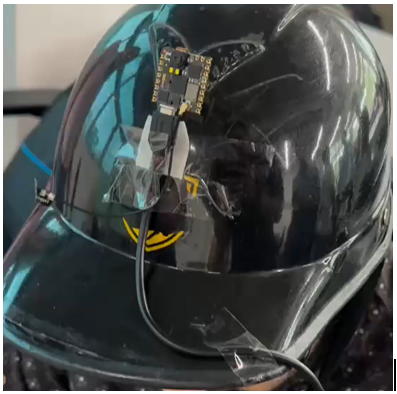
A helmet is used to which the Nicla Vision module is attached. The Nicla Vision takes the real time input from the environment and gives the output in the form of text in the OpenMV IDE.
NOTE: THE VIDEO OF THE DEMO IS ATTACHED SEPARATELY IN THE SUBMISSION FILE
Challenges and Workarounds
-
Data Collection Complexity: Capturing diverse and balanced datasets for all 10 object classes was time-consuming. Ensuring proper lighting conditions, clear object visibility, and class separation required repeated iterations and manual effort. We also had to label the images carefully to avoid misclassifications during training.
-
Audio Feedback Integration: Converting the text output from the Nicla Vision into real-time audio proved more complex than expected. The Nicla Vision lacks built-in audio output capabilities, and initial attempts to connect audio modules directly were limited by hardware constraints.
-
Raspberry Pi Integration Trials: To enable voice feedback, we explored using a Raspberry Pi to read the serial output from Nicla Vision and convert it into speech using Python-based text-to-speech (TTS) libraries. Although this setup was partially successful, we faced issues like serial communication delays and voice clarity tuning. Nonetheless, the experience gave us a clear path for extending the device in future iterations.
Future Scope
-
Audio Feedback Integration: The most immediate upgrade involves integrating audio output to provide spoken alerts for detected objects. This will be achieved by connecting the Nicla Vision to a Raspberry Pi, which will read serial outputs and convert them to speech using Python-based text-to-speech libraries.
-
Voice Command Recognition: Adding a microphone module and implementing voice command recognition will allow hands-free interaction. Users could ask for the status of the environment or trigger specific functions through speech.
-
Edge Optimization and Battery Efficiency: Further optimizing the model for smaller size and faster inference can help extend battery life and reduce latency, making the device more practical for continuous outdoor use.
-
Expanded Dataset and Class Categories: Future datasets can include more diverse environments (e.g., stairs, crossings, signboards) and new object types to increase the system’s accuracy and real-world usability.
-
Wearable Integration: The final product can be embedded into a wearable form factor such as a chest-mounted or spectacle-mounted device, making it comfortable and discreet for daily use.
References
- https://mlsysbook.ai/contents/labs/arduino/nicla_vision/object_detection/object_detection.html
-
H. Rithika and B. N. Santhoshi, “Image text to speech conversion in the desired language by translating with Raspberry Pi,” 2016 IEEE International Conference on Computational Intelligence and Computing Research (ICCIC), Chennai, India, 2016, pp. 1-4, doi: 10.1109/ICCIC.2016.7919526.
Keywords: Speech; Cameras; Engines; Optical character recognition software; Google; Pins; Raspberry Pi; Tesseract OCR engine; Google Speech API; Microsoft translator; Raspberry Pi camera board