ECG Signal Acquisition and Arrhythmia Detection using Arduino
Introduction
This project aimed to build a simple, standalone ECG analyzer using a microcontroller, intended for quick, on-device assessment of heart activity without relying on a full clinical setup. The motivation came from the need for accessible and portable cardiac monitoring, especially in areas where medical infrastructure is limited or continuous monitoring is not feasible.
Instead of sending ECG data to a PC for analysis, the goal was to run everything on the device itself. A compact machine learning model was trained to detect patterns such as normal rhythm, atrial fibrillation, and first-degree AV block, uncertain (when subject is not in contact with the electrodes in the prescribed fashion) and deployed onto the Arduino Nano 33 BLE. An OLED display was used to show predictions in real time.
Solving this problem was important because early detection of cardiac irregularities can make a significant difference in treatment outcomes. Bringing basic AI-based diagnostics to the edge makes it easier to deploy such systems in real-world, low-resource scenarios.
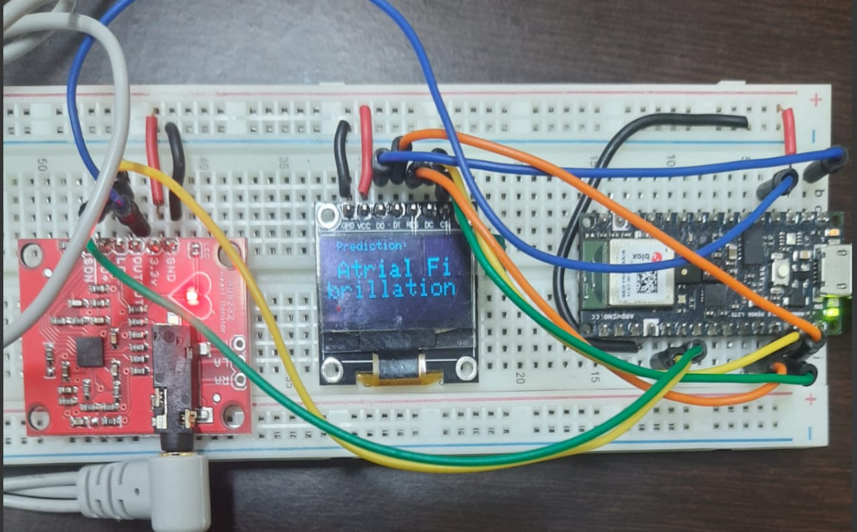
Methodology
List of hardware required and their specifications
-
Arduino Nano 33 BLE
Acts as the main processing unit. With a 64 MHz ARM Cortex-M4 CPU and onboard BLE, it is capable of handling real-time signal acquisition and basic ML inference. -
AD8232 ECG Sensor Module
A compact analog front-end designed to extract, amplify, and filter small biopotential signals like ECG. It provides a clean analog waveform suitable for microcontroller ADCs. -
OLED Display (128×64, SSD1306)
Used to visually display the classification output (e.g., Normal, AFib, AV Block) in real time. Communicates over SPI protocol. -
ECG Electrodes and Gel
Standard adhesive electrodes used to capture biopotentials from the skin and relay them to the AD8232 module.
List of software used
-
Edge Impulse Studio
For model training and deployment. It allows signal preprocessing, feature extraction, and model export as C++ code optimized for edge devices. -
Arduino IDE (v2.3.4)
To develop, compile, and upload the embedded code onto the Arduino Nano 33 BLE. -
MATLAB (for offline simulation)
Used to simulate ECG conditions like Atrial Fibrillation and AV Block to generate labeled training data. -
Adafruit SSD1306 and GFX Libraries
Open-source libraries used to control the OLED screen and render text output efficiently.
Data collection
Training data was prepared using ECG signals that simulate various cardiac conditions like normal rhythm, atrial fibrillation, and first-degree AV block. The healthy signals were taken using the setup shown below and a few seconds of the acquired signal is also shown below.
MATLAB was used to create these variations and export them as time-series data for model training. To simulate 1st degree Atrial Ventricular Block, the P wave of ECG was suppressed, and for Atrial Fibrillation, the duration between the R-peaks was increased, highlighting the delay in electrical signal from the Sino-Atrial Node. This was done using Signal Editor on Simulink.
Model development and compression
The model was developed using Edge Impulse Studio with spectral features extracted from the ECG signals. A lightweight neural network classifier was chosen to balance accuracy and memory usage. To make the model fit edge constraints, post-training quantization was applied, converting weights to 8-bit integers while retaining performance.
Model deployment
After testing and validating the model on Edge Impulse Studio, the inference code was exported as a C++ library and integrated into the Arduino environment. The final firmware was uploaded to the Arduino Nano 33 BLE, enabling real-time ECG signal classification directly on the device. The prediction output was displayed on an OLED screen.
Prototype and Demo
Figure 4:
- (Left) System shows “Normal” when connected properly
- (Right) shows “Uncertain” when not connected properly
Project Resources
Challenges and Workarounds
- Noisy ECG signals due to poor contact were handled by adding an Uncertain class to the model.
- Limited memory on Arduino Nano 33 BLE was addressed using post-training model quantization.
- Lack of real ECG data was overcome by simulating AFib and AV Block patterns in MATLAB.
- Real-time performance was achieved by optimizing inference and using a fast-refresh OLED display.
References
-
Dr Matthew Jackson · ECG Interpretation · February 28, 2011 · Last updated: January 6
“How to Read an ECG: ECG Interpretation: EKG.” Geeky Medics, 6 Jan. 2025,
geekymedics.com/how-to-read-an-ecg/