Air Piano: Real-Time Finger Detection for Virtual Piano Playing
Introduction
Instead of playing a heavy, expensive instrument like a piano, you can wave your hands in the air to create sounds!
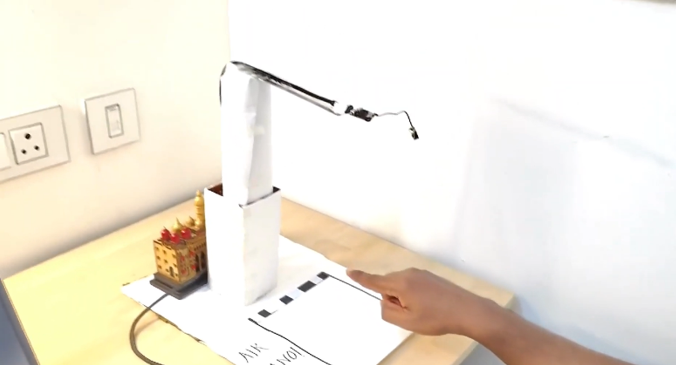
Using the Arduino Nicla Vision board, we built a system to detect finger movements and turn them into music. A FOMO-based model was developed to detect these gestures in real time, achieving a validation F1 score of 78.1%. To run on Nicla Vision’s limited resources, the model was optimized and compressed into a 56 KB TFLite file.
The pipeline translates detected finger positions into 8 virtual piano keys, sending serial commands to a connected computer to produce music.
This project is a successful integration of creativity, machine learning, and embedded systems—delivering an innovative, real-time, and interactive musical experience.
- No heavy instruments: Pianos are hard to move around. Our system makes music creation lightweight and mobile.
- Low cost: Instruments are expensive. This makes music fun and affordable for everyone.
- Interactive and engaging: Play music just by waving your fingers in the air—magical and intuitive!
Methodology
Hardware Requirements
- Arduino Nicla Vision
Software Used
- Edge Impulse Studio / Google Colab – for training and deploying the FOMO object detection model
- OpenMV IDE – for programming Nicla Vision and integrating the model with custom logic
- Python – for preprocessing images and linking gestures to sound playback via serial communication
3. Working Principle
Step 1: Camera Initialization
Nicla Vision’s camera captures frames continuously.
Step 2: Image Preprocessing
Each frame is cropped and resized for the FOMO model (96×96 grayscale).
Step 3: Running the Model
The model detects the index finger and returns:
- Label
- Confidence score
- Bounding box:
(x, y, width, height)
Step 4: Interpreting Results
- Bounding box area = width × height
- Larger area → finger is closer (release)
- Smaller area → finger is farther (press)
Step 5: Mapping to Piano Keys
- Image width (240px) is split into 8 zones (30px each)
- Bounding box center (x + width / 2) → mapped to key:
key = center_x // 30
Step 6: Detecting Press Events
Changes in bounding box area across frames detect press vs. release.
Step 7: Continuous Loop
Real-time loop for detection and sound playback.
Data Collection
- Device: Arduino Nicla Vision
- Setup: Mounted 35 cm above tabletop
- Captured: 3-minute video → ~683 frames
Dataset Breakdown
- 546 images for training
- 137 images for validation
Labeled Classes
Index Finger(with bounding box)Fist(with bounding box)Background(no annotations)
Data Augmentation
- Transformations: Rotation, scaling, flipping
- Final dataset size: 1,689 images
Model Development and Compression
Phase 1: Initial Model
- Input: RGB 320×240 → downscaled to 48×48 grayscale
- Pre-quantization model size: 351.41 KB, accuracy: 74.34%
- Post-quantization (int8): 96.40 KB, accuracy: 55.75%
Phase 2: Optimized FOMO Model (Edge Impulse)
- Architecture: FOMO (MobileNetV2 0.35)
- Input: 96×96 grayscale
- Output classes: Finger, Fist
Performance
- F1 Score: 78.1%
- Precision (non-bg): 75%
- Recall (non-bg): 82%
- Inference time: 65 ms
Final Deployed Model
- Format:
trained.tflite - Size: 56.0 KB
Final Testing Results
- Accuracy: 70.73%
- Precision: 70%
- Recall: 78%
- F1 Score: 74%
Prototype and Demo
-
GitHub Repo:
github.com/btech10423/Air-Piano-Real-Time-Finger-Detection-for-Virtual-Piano-Playing -
Demo Video:
Watch on YouTube
Challenges and Workarounds
-
Gesture Confusion (Finger vs Fist):
Solution: Added more diverse training samples + augmentation → F1 score boosted to 78.1%. -
Laggy Performance:
Solution: Reduced input to 96x96 grayscale + model optimization → achieved real-time response. -
Press Threshold Tuning:
Solution: Trial-and-error for bounding box area threshold → achieved reliable press detection.
References
-
FOMO Object Detection Docs:
Edge Impulse FOMO Guide -
FOMO Model Video Explanation:
YouTube: FOMO Model for Edge AI